🔨 Solve Tickets
Feedback and a healthy discussion culture are essential to any collaboration.
To create an easy and fast entry into our IaD world, we want to foster and moderate this feedback by providing templates to raise bugs and feature requests in a consistent process across all components, making it easier for contributors to participate in various projects.
Are you missing a feature or have you spotted a bug? Get involved and help us make Infrastructure as Data better, step by step, and expand it into new areas.
With open source we want to:
- Promote reuse and collaboration
- Increase the quality of code and documentation
- Enable cross-team and cross-organization innovation
- Give everyone access and the opportunity to shape the future of creating and managing infrastructure in the cloud
To see all related open-source projects, go to:
Types of projects
There are different types of projects we want to share for collaboration. Let's revisit their purpose to jointly move in a shared direction.
Shared Documentation
The Shared Documentation is a place where we want to share best practices, guides, and other helpful information that can be used across all our projects. It is not meant to be a place for project-specific documentation, but rather a place for general information and best practices that can be applied to all projects.
In case of typos, confusing guides, missing information, or if you think an entire topic is missing, please don't hesitate to submit an improvement. We welcome any contribution that makes our documentation better and more helpful for everyone.
The Shared Documentation repository can be found here: crossplane-provider-docs
Provider
Providers are Crossplane packages that bundle a set of Managed Resources and their respective controllers to allow Crossplane to provision the respective infrastructure resources.
All providers related to this project can be found in the list below. If you are interested in contributing to one of them, please check out the respective repository and get in touch.
| Provider Name | Description | Repo Link | Backlog Link | Bug? Feature? |
|---|---|---|---|---|
| crossplane-provider-btp | Crossplane Provider for SAP BTP | Repo | Backlog | Create a new issue |
| crossplane-provider-hana | Crossplane Provider for SAP HANA | Repo | Backlog | Create a new issue |
| crossplane-provider-cloudfoundry | Crossplane Provider for Cloud Foundry | Repo | Backlog | Create a new issue |
Other powerful helpers
In addition to the providers, there are also other repositories related to this project. These repositories most often originated from a specific pain point identified during the process of creating and maintaining the providers.
One great example is xp-clifford, a Crossplane Provider Export CLI framework for resource data extraction. It makes it easy to build a CLI tool that can export definitions of external resources in the format of a specific Crossplane Provider's managed resource definitions.
All our powerful helpers that make your life easier can be found in the list below. If you are interested in contributing to one of them, please check out the respective repository and get in touch.
| Helper Name | Description | Repo Link | Backlog Link | Bug? Feature? |
|---|---|---|---|---|
| xp-clifford | Crossplane Provider Export CLI framework for resource data extraction | Repo | Backlog | Create a new issue |
Contribution steps
We would love to see you contributing to our projects, whether it's a small typo fix in the documentation or a new feature in one of our providers. Every contribution is welcome and helps us improve our projects. If you are interested in contributing, please check out the respective repository and get in touch with us. We are happy to support you on your contribution journey.
Contribute as reviewer
We like to develop software that truly solves the problems of our users. To ensure this, we need your feedback on our work. That means everyone is welcome to comment on open PRs and issues, give feedback, and share their opinion. Due to different access rights, to be a reviewer who can approve PRs you need to be a member of this repository's team. If you are interested in becoming a reviewer, please get in touch with us.
Contribute as creator
For additional rights to open PRs and branches, you need to be a contributor. If you don't have it feel free to create a fork of the repository and open PRs from there. If you are interested in becoming a contributor, please get in touch with us.
- Ensure you are a contributor to the repository you want to contribute to (if not, create a fork and open PRs from there)
- Create a new branch from
main, e.g.feat/addNewResourceXYZ - Work on your contribution and get in touch with us if you need support
- After finalizing your contribution, create a
pull requestagainstmain - In the pull request, document your changes including:
- Reason for the contribution or change
- Description of the feature and the use cases / solved requirements
- Suitable reviewers for your change
- Your contribution will be reviewed (and hopefully approved) by the maintainers of the project team
Bugs
If you spot an error or misbehavior in any of the components, please report it using the bug template available in the specific repository of the provider/helper/documentation.
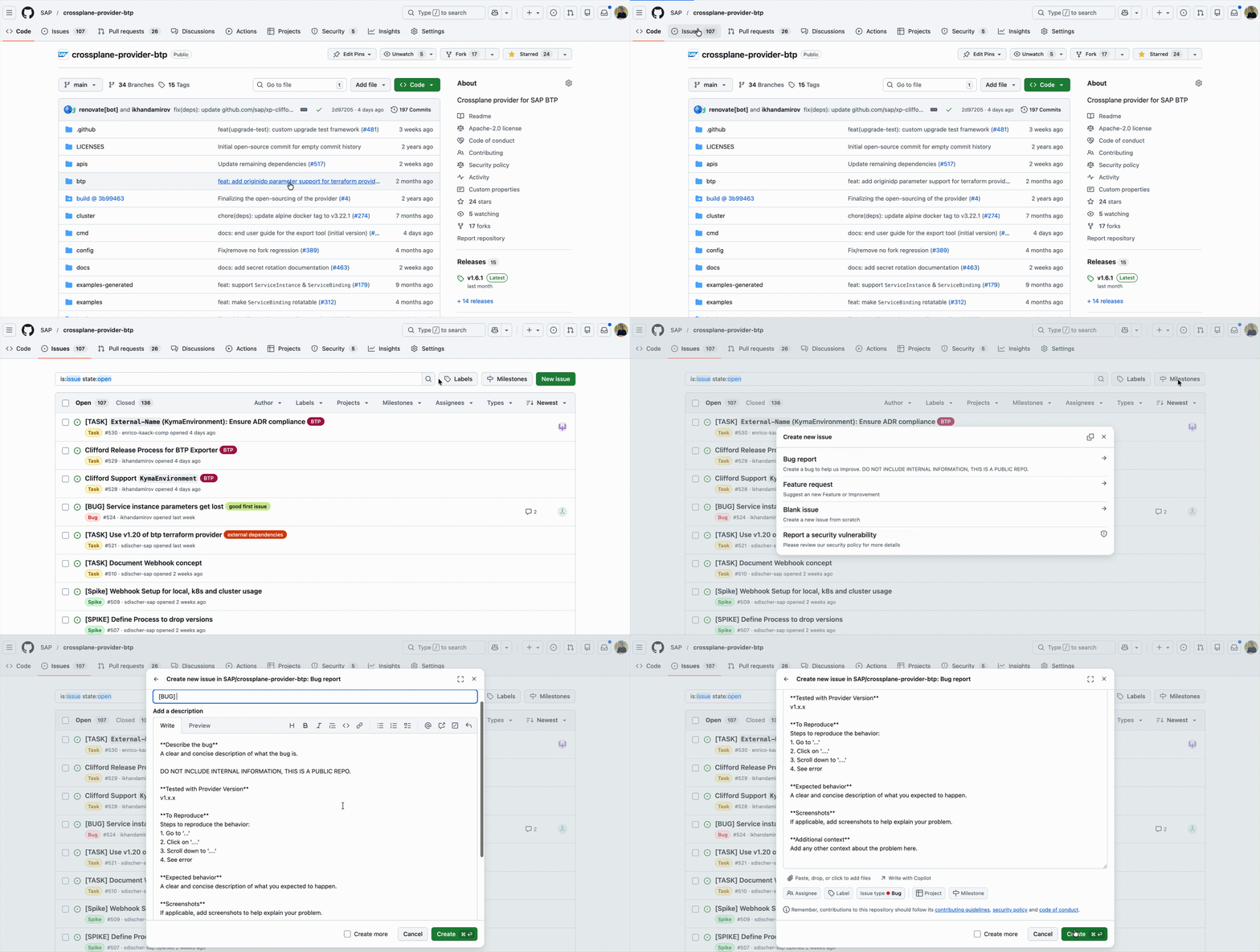
Bug flow
- Create a bug using the template
- Please use the built-in search to look for possible duplicates
- An owner of the repository, or its contributors, will review and provide feedback. Everyone is welcome to join the discussion and share their opinion.
- Valid: Added to backlog or linked to existing bugs
- Invalid: Closed, open for discussion, reopen if applicable.
- More feedback required: The issue will stay open for some time and will have an
author-action-neededlabel to indicate that more information is needed from the issue author to reach a conclusion.
- The task will be picked up by a contributor (maybe even yourself) and merged into
main. - On completion, backlog items as well as GitHub issues will be marked as Done by the contributor.
To stay up to date, we recommend using GitHub's notification subscription.
Feature Requests
If you believe a feature is missing in shared components, please do not hesitate to get in touch with the community of the repository.
Feature Requests flow
- Create a feature request using the template provided in the specific repository of the provider/helper/documentation.
- Please use the built-in search to look for possible duplicates beforehand
- An owner of the repository, or its contributors, will review and provide feedback. Everyone is welcome to join the discussion and share their opinion.
- Valid: Added to backlog or linked to existing issues
- Invalid: Closed, open for discussion, reopen if applicable.
- More feedback required: The issue will stay open for some time and will have an
author-action-neededlabel to indicate that more information is needed from the issue author to reach a conclusion.
- The task will be picked up by a contributor (maybe even yourself) and merged into
main. - On completion, backlog items as well as GitHub issues will be marked as Done by the contributor.
Start a discussion
Sometimes, you want to reach out to the community to exchange ideas on coding topics or find additional stakeholders for a possible feature request. To keep discussions around providers, helpers, and other artifacts searchable and persistent, we encourage using the discussions tab in the respective repository.
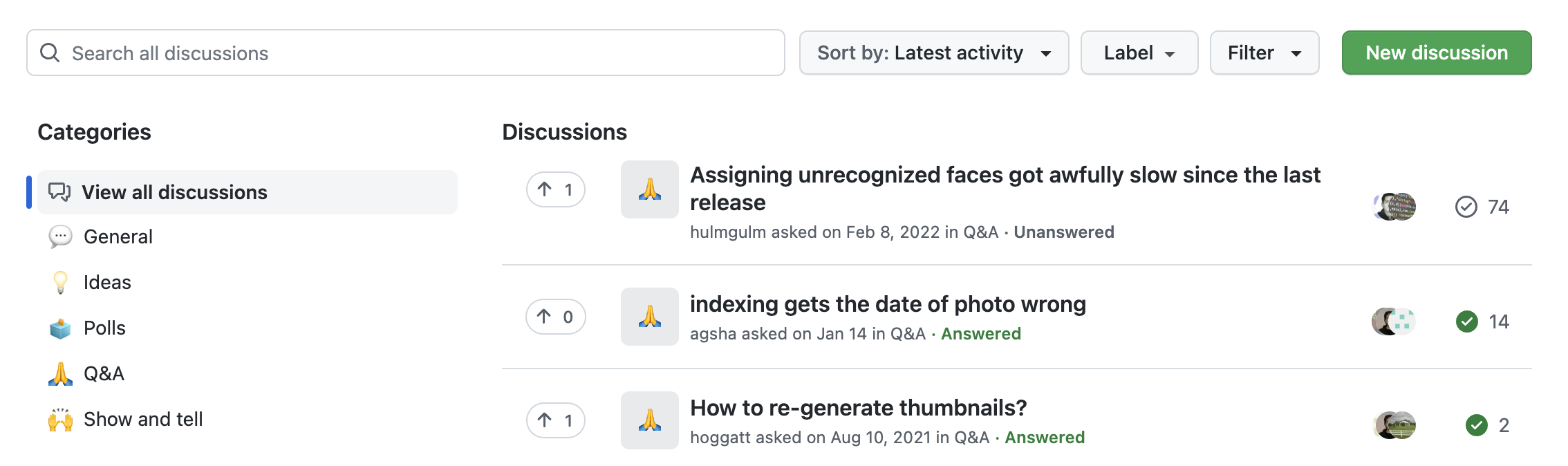
Bug fix
If you want to directly contribute a fix for a bug, please follow the steps below:
- Assign the bug to yourself to indicate that you are working on it
- Move the issue to "In Progress" in the project board
- Create a new branch from
main, e.g.fix/issue-123-description - Do the important work on your fix 🔧
- After finalizing your fix, create a
pull requestagainstmain - In the pull request, document your changes including:
- Reason for the contribution or change
- Description of the fix and the use cases / solved requirements
- Suitable reviewers for your change (feel free to reach out to us if you need help)
- A reference to the original bug issue
- Check that your contribution meets the Definition of Done and that all tests are passing
- Create a release candidate
- Get in contact with the issue reporter to validate your fix 💬