Overview
Quick Start
For a quick start check out the "Getting Started" page.
What is the SAP Cloud SDK for JavaScript?
The SAP Cloud SDK for Python provides building blocks for cloud-native AI agents and BTP integrations — type-safe clients for destinations, identity, storage, telemetry, audit logging, and more.
Install with pip install sap-cloud-sdk.
Modules
Agent Modules
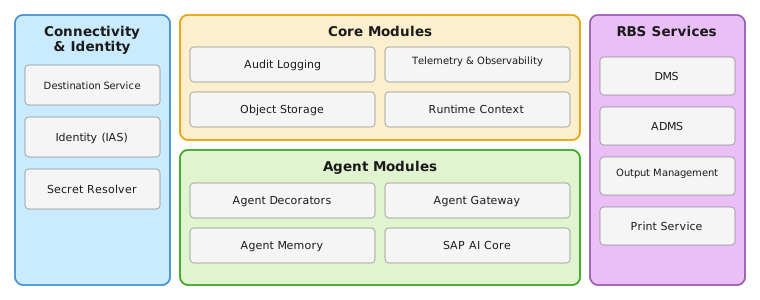
Building blocks for AI-powered agents on SAP BTP: the Agent Decorators expose configuration fields (prompts, model, settings) to a low-code UI; the Agent Gateway discovers MCP tools from connected LoB systems with tenant-aware principal propagation; the Agent Memory service stores conversation history and long-term semantic memories backed by SAP HANA Cloud; and the AI Core client manages deployments and executions.
Connectivity & Identity
The Destination Service resolves credentials and handles OAuth flows (client credentials, principal propagation) for cloud and on-premise systems. The IAS module parses SAP Identity Authentication Service tokens into typed claims. The Secret Resolver loads service credentials from mounted volumes (Kubernetes) or environment variables (Cloud Foundry / local).
Core Modules
Cross-cutting utilities for any application type: Audit Logging emits structured events to the SAP Audit Log Service; Telemetry auto-instruments traces and metrics for SAP Cloud Logging via OpenTelemetry; Object Storage manages files on SAP BTP Object Store Service; and the Runtime Context propagates tenant, user, and trigger-type across async tasks without framework coupling.
RBS Services
Clients for SAP RBS services: DMS for document and folder management (CMIS), ADMS for the Advanced Document Management OData V4 API, Output Management for sending output requests, and the Print Service for managing queues and submitting print tasks.
Requirements & Links
- Python: 3.11, 3.12, or 3.13
- Environments: SAP BTP Cloud Foundry, Kubernetes / SAP Gardener, SAP BTP Kyma, Deploy with Confidence (DwC)
- License: Apache 2.0
- PyPI: sap-cloud-sdk
- Release notes: Changelog
- Contributing: Contribution guide