Kubeapps Releases Developer Guide
The purpose of this document is to guide you through the process of releasing a new version of Kubeapps.
0 - Ensure all 3rd-party dependencies are up to date
This step aims at decreasing the number of outdated dependencies so that we can get the latest patches with bug and security fixes. It consists of four main stages: update the development images, update the CI, update the chart and, finally, update the dependencies.
0.1 - Development images
For building the development container images, a number of base images are used in the build stage. Specifically:
- The dashboard/Dockerfile uses:
- bitnami/node for building the static files for production.
- bitnami/nginx for serving the HTML and JS files as a simple web server.
- Those services written in Golang use the same bitnami/golang image for building the binary, but then a scratch image is used for actually running it. These Dockerfiles are:
- Those services written in Rust use the same _/rust image for building the binary, but then a bitnami/minideb image is used for actually running it. These Dockerfiles are:
In some images, some build-time linters or tools are used (e.g., buf linter, gosec or golangci-lint checkers,grpc-health-probe, etc.).
When updating the base container image, these tools (like BUF_VERSION, GOLANGCILINT_VERSION, GRPC_HEALTH_PROBE_VERSION) should be updated to the latest minor/patch version.
As part of this release process, these image tags must be updated to the latest minor/patch version. In case of a major version, the change should be tracked in a separate PR. Note: as the official container images are those being created by Bitnami, we should ensure that we are using the same major version as they are using.
0.2 - CI configuration and images
In order to be in sync with the container images while running the different CI jobs, it is necessary to also update the CI image versions. Find further information in the CI configuration and the e2e tests documentation.
0.2.1 - CI configuration
In the GitHub Actions Kubeapps General Workflow definition we have an initial declaration of the variables used along with the file. The versions used there must match the ones used for building the container images. Consequently, these variables must be changed accordingly:
CHARTMUSEUM_VERSIONshould be updated with the latest stable version from the chartmuseum/charts releasesDOCKER_REGISTRY_VERSIONcan be updated to the latest tag provided by DockerFLUX_VERSIONshould be updated with the latest stable version from the Flux releasesGITHUB_VERSIONshould be updated with the latest stable version from the GitHub CLI releasesGOLANG_VERSIONmust match the versions used by our services written in Golang, for instance, kubeapps-apis- The Go version used in the CodeQL GitHub Action might be updated as well
GOLANGCI_LINT_VERSIONshould be updated with the latest stable version from the golangci-lint releases- The GitHub Action golangci/golangci-lint-action used in linters.yaml needs to be verified too
HELM_VERSION_MINmust match the one listed in the Bitnami Application Catalog prerequisitesHELM_VERSION_STABLEshould be updated with the latest stable version from the Helm releasesK8S_KIND_VERSIONmust match the Kubernetes minor version used inKUBECTL_VERSIONand should be updated with one of the available image tags for a given Kind releaseKIND_VERSIONshould be updated with the latest stable version from the kind releasesKUBECTL_VERSIONshould match the Kubernetes minor version (or minor version +1) used by Kind andK8S_KIND_VERSIONand listed in the Kubernetes releases pageMKCERT_VERSIONshould be updated with the latest stable version from the mkcert releasesNODE_VERSIONmust match the major version used by the dashboardOLM_VERSIONshould be updated with the latest stable version from the OLM releasesPOSTGRESQL_VERSIONmust match the version used by the Bitnami PostgreSQL chartRUST_VERSIONmust match the version used by the pinniped-proxySEMVER_VERSIONshould be updated with the latest stable version from the semver releases
As part of this release process, these variables must be updated accordingly. Other variable changes can be tracked in a separate PR.
0.2.2 - CI integration image and dependencies
We use a separate integration image for running the e2e tests consisting of a simple Node image with a set of dependencies. Therefore, upgrading it includes:
- The integration dependencies can be updated by running:
cd integration
yarn upgrade
- The integration/Dockerfile uses a mcr.microsoft.com/playwright image for running the e2e tests.
As part of this release process, this Node image tag may be updated to the latest minor/patch version. In case of a major version, the change should be tracked in a separate PR. Analogously, its dependencies may also be updated, but in case of a major change, it should be tracked in a separate PR.
0.3 - Protobuf dependencies and autogenerated code
As per the introduction of the new Kubeapps APIs service, it is based upon automatic code generation for both the frontend code and backend code. Given that generation rules can evolve to improve or reduce possible bugs, it is important to perform a periodic update.
- To upgrade the
buf-related dependencies, just run:
# You need to have the latest buf binary installed, if not, go to https://docs.buf.build/installation/
make buf-mod-update
- Next, the autogenerated code ought to be regenerated.
# You need to have the latest buf binary installed, if not, go to https://docs.buf.build/installation/
make buf-generate
As part of this process, the autogenerated API documentation
may have changed. If so, it must be updated in the API docs we bundle in the dashboard.
To do so, the autogenerated file should be first converted to OpenAPI 3 (using, for instance, some of the tools mentioned in this post). Then, just copy the
paths and components sections from the generated file to the dashboard's openapi.yaml file. Finally, note that all the paths in the openapi.yaml file must be prefixed
with /apis/, so that the interactive API docs work properly.
As part of this release process, the buf.lock dependencies must be updated to the latest versions. In case of a major version, the change should be tracked in a separate PR.
0.4 - Upgrading the code dependencies
Currently, we have three types of dependencies: the dashboard dependencies, the golang dependencies, and the rust dependencies. They must be upgraded to the latest minor/patch version to get the latest bug and security fixes.
Dashboard dependencies
Upgrade the dashboard dependencies by running:
cd dashboard
yarn upgrade
Note: If there are certain dependencies which cannot be updated currently, yarn upgrade-interactive allows selecting just certain items for upgrade.
Golang dependencies
Check the outdated golang dependencies by running the following (from How to upgrade and downgrade dependencies):
go mod tidy
go list -u -f '{{if (and (not (or .Main .Indirect)) .Update)}}{{.Path}}: {{.Version}} -> {{.Update.Version}}{{end}}' -m all 2> /dev/null
Then, try updating to the latest version for all direct and indirect dependencies of the current module running this command:
go get -u ./...
In case this above command fails (for example, due to an issue with transitive dependencies), you can manually upgrade those versions. A useful tool for doing so is go-mod-upgrade.
Rust dependencies
Upgrade the rust dependencies by running:
cd cmd/pinniped-proxy/
cargo update
and
cd cmd/oci-catalog/
cargo update
Security and chart sync PRs
Finally, look at the pull requests and ensure there is no PR open by Dependabot
or kubeapps-bot fixing a security issue or bringing upstream chart changes. If so, discuss it with another Kubeapps maintainer
and come to a decision on it, trying not to release with a high/medium severity issue.
As part of this release process, the dashboard deps must be updated, the golang deps should be updated, the rust deps should be updated and the security check must be performed.
Send a PR with the upgrades
Now create a Pull Request containing all these changes (only if no major versions have been bumped up) and wait until for another Kubeapps maintainer to review and accept so you can merge it.
0.5 - Update the website engine
The Kubeapps website is built using Docusaurus. Docusaurus is a static site generator written in Go. It is used to generate the Kubeapps website from Markdown files and HTML templates. The Kubeapps website is hosted on GitHub Pages.The GitHub Action in this repository automatically builds and deploys websites when new code is pushed to our git repository.
To update the website engine, go to /site and execute a docusaurus upgrade based on the official documentation.
0.6 - Update the Helm chart
The Kubeapps Helm chart is located in the chart/kubeapps directory. It must be updated to reflect the new versions of the container images used in this release.
To do so, follow these steps:
- Update the
values.yamlfile in thechart/kubeappsdirectory to reflect the new versions of the container images used in this release. - Update the
Chart.yamlfile in thechart/kubeappsdirectory to reflect the new version of the chart. The chart version must be updated according to the Semantic Versioning rules based on the changes included in this release.
1 - Select the commit to be tagged and perform some tests
Once the dependencies have been updated and the chart changes merged, the next step is to choose the proper commit so that we can base the release on it. It is, usually, the latest commit in the main branch. Then, some manual and automated tests should be performed to ensure the stability and reliability of the release.
1.1 - Perform a manual test
Even though we have a thorough test suite in our repository, we still must perform a manual review of the application as it is in the selected commit. To do so, follow these instructions:
- Perform a checkout of the chosen commit.
- Install Kubeapps using the development chart:
helm install kubeapps ./chart/kubeapps/ -n kubeapps- Note that if you are not using the latest commit in the main branch, you may have to locally build the container images so that the cluster uses the proper images.
- Ensure the core functionality is working:
- Add a repository
- Install an application from the catalog
- Upgrade this application
- Delete this application
- Deploy an application in an additional cluster
2 - Create a git tag
Next, create a tag for the aforementioned commit and push it to the remote repository. Please note that the tag name will be used as the release name.
When a new tag is detected, Bitnami will automatically build a set of container images based on the tagged commit. They later will be published in the Bitnami Dockerhub image registry. Please note that this workflow is run outside the control of the Kubeapps release process. Please note also that the Bitnami Catalog will publish a version of the chart whenever one (single) image is published, which means that we need to be careful if any Kubeapps component updates are interdependent, perhaps requesting the Kubeapps chart publishing be paused until all images are published.
For doing so, run the following commands:
export VERSION_NAME="v1.0.0-beta.1" # edit it accordingly

git tag ${VERSION_NAME} -m ${VERSION_NAME}
git push origin ${VERSION_NAME} # replace `origin` by your remote name
You can retrieve the
VERSION_NAMEusing the semver tool for properly increasing the version from the latest pushed tag:export VERSION_NAME="v$(semver bump <major|minor|patch> $(git fetch --tags && git describe --tags $(git rev-list --tags --max-count=1)))"
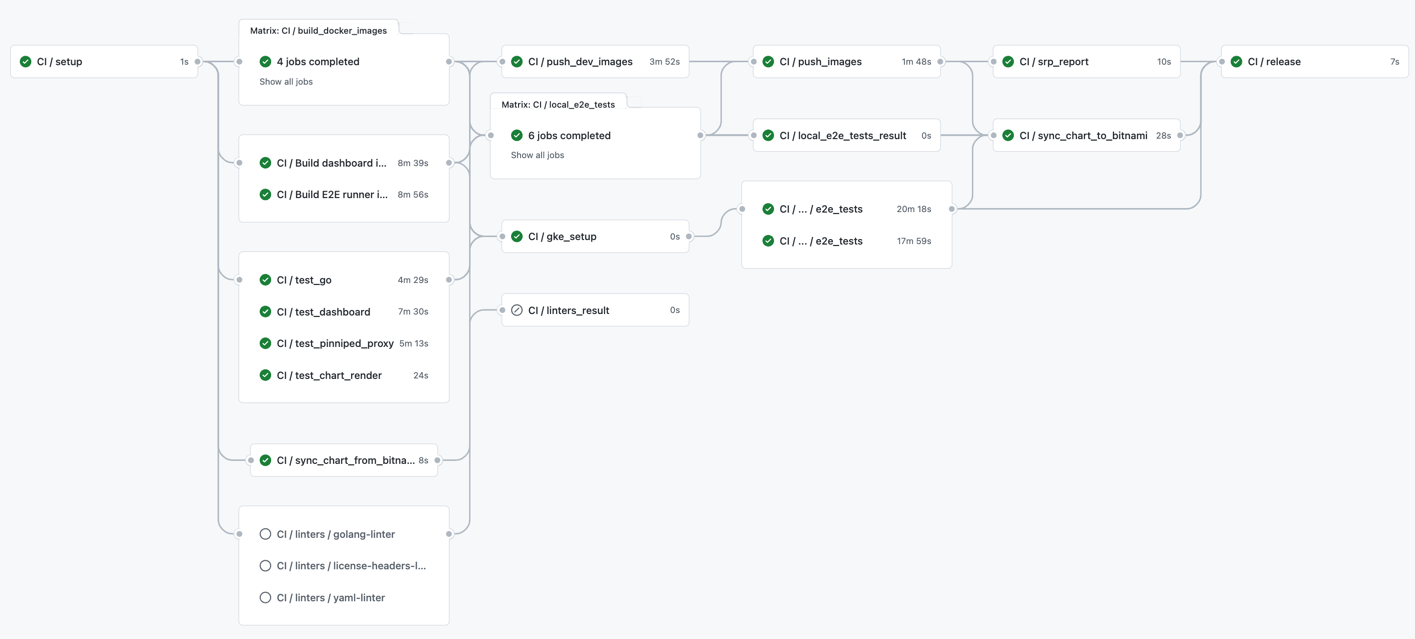
A new tag pushed to the repository will trigger, apart from the usual test and build steps, the Release Pipeline as described in the CI documentation. An example of the triggered workflow is depicted below:
3 - Complete the GitHub release notes
Once the release job is finished, you will have a pre-populated draft GitHub release.
You still must add a high-level description with the release highlights. Please take apart those commits just bumping dependencies up; it may prevent important commits from being clearly identified by our users.
Then, save the draft and do not publish it yet and get these notes reviewed by another Kubeapps maintainer.
4 - Publish the GitHub release
Once the new version of the Kubeapps Chart has been added to the helm index.yaml through the Helm Index Publisher has been published and the release notes reviewed, you are ready to publish the release by clicking on the publish button in the GitHub releases page.
5 - Promote the release
Tell the community about the new release by using our Kubernetes slack #kubeapps channel. If it includes major features, you might consider promoting it on social media.