Documentation
CAP Operator deploys and manages the lifecycle of multi-tenant SAP Cloud Application Programming Model based applications and related components, within a Kubernetes cluster.
What are the main features of CAP Operator?
- Quick and easy deployment of CAP application back ends, router, and related networking components.
- Integration with SAP Software-as-a-Service Provisioning service to handle asynchronous tenant subscription requests, executing provisioning / deprovisioning tasks as Kubernetes jobs.
- Automated upgrades of known tenants as soon as new application versions are available.
- Support of deployment of service-specific content / configuration as a Kubernetes job with every application version (for example, HTML5 application content to SAP HTML5 Application Repository service).
- Management of TLS certificates and DNS entries related to the deployed application, with support of customer-specific domains.
Here’s an overview of the major automation steps handled by CAP Operator during the deployment of the application:
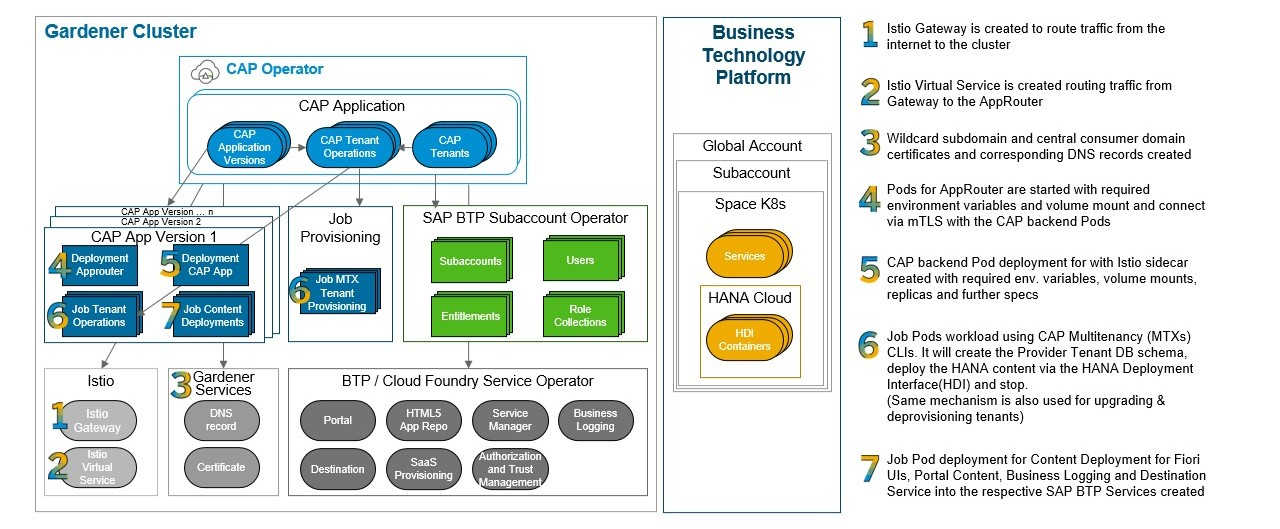
Explore the following chapters to learn more.
1 - Concepts
Motivation and overview of components
Provisioning and operating a SAP Cloud Application Programming Model application on a Kubernetes cluster requires deploying various components in addition to the CAP application server (see a list of typical components). Some of these components can be created during initial system provisioning, while others need to be created or updated at different points in the application lifecycle (DAY 2 operations).
Using Helm charts to manage the deployment of a CAP application supports initial system provisioning, but further lifecycle operations (such as tenant provisioning) triggered by external components (SAP BTP) require manual adjustment of the deployed resources. For example, VirtualServices (part of the Istio service mesh) must be created during tenant provisioning to route incoming HTTP requests on the new tenant subdomain to the application server. Another limitation of Helm charts is the lack of control over the order in which resources are created.
You can gain greater control over deployment and automate lifecycle operations by extending the Kubernetes API with custom resources that describe CAP application components and their configuration, along with controllers to reconcile them. Like standard Kubernetes controllers, these custom controllers watch for changes in custom resource objects and work to bring the cluster state to the desired state.
CAP Operator comprises custom resource definitions that describe CAP application components, a controller to reconcile these resources, and other components that support lifecycle management.
1.1 - CAP Operator Overview
An overview of the architecture
CAP Operator consists of the following components:
- CAP Controller: A native Kubernetes controller that reconciles custom resources defined as part of the operator.
- Webhooks: Validating webhooks that ensure consistency of custom resource objects submitted to the Kubernetes API server.
- Subscription Server: A web server that handles HTTP requests submitted by SAP BTP
saas-registry service instances during tenant subscription and unsubscription.
The following diagram shows how the main components interact when deployed to a cluster:

For more details about each component, see the following pages.
1.1.1 - Controller
Reconciliation of custom resource objects
The CAP controller uses client-go from Kubernetes, which provides the tools and utilities needed to interact with the Kubernetes API server and manage the custom resources included in CAP Operator.
The controller uses Informers to watch certain resources and invokes registered event handlers when these resources are modified. To streamline the processing of such notifications, rate limiting queues are implemented, which store the changes and allow the processing of these items in independent reconciliation threads (go routines). Such a design allows sequential processing of the changed items and avoids conflicts.
The following namespaced custom resources have been defined to be reconciled by the CAP controller:
CAPApplication: defines a high-level application, its domains, and the consumed SAP BTP servicesCAPApplicationVersion: defines a child resource of the CAPApplication, which contains container images that will be used to deploy application components (workloads) of a specific versionCAPTenant: represents a child resource of the CAPApplication which corresponds to an SAP BTP subaccount subscribed to the applicationCAPTenantOperation: represents a provisioning, deprovisioning, or upgrade operation on a tenant that is scheduled as a child resource of a CAPTenant and executed as a sequence of specified steps.
Parent-child relationships between custom resources are established by defining owner references for the children.

1.1.2 - Subscription Server
Integration with SAP Software-as-a-Service Provisioning service (SaaS)
The Subscription Server handles HTTP requests from the SAP Software-as-a-Service Provisioning service for tenant subscription operations on SAP Cloud Application Programming Model applications installed in the cluster.
During the creation of a saas-registry service instance (in the provider subaccount), callback URLs are configured to point to the subscription server routes.
When a consumer tenant subscribes to an application managed by the operator, the subscription server receives the callback, validates the request, and creates a CAPTenant custom resource object for the identified CAPApplication.
The subscription server returns an Accepted (202) response and starts a background routine that polls for tenant status while the CAPTenant changes are independently reconciled by the controller.
Once the tenant provisioning process completes (or fails), the tracking routine returns the appropriate status to the SaaS Registry via an asynchronous callback.

(More details about asynchronous tenant subscription.)
This asynchronous approach avoids timeouts during synchronous calls and enables scheduling dedicated jobs (via CAPTenantOperation) for completing the subscription and performing any additional cluster tasks (for example, creating a VirtualService for the tenant subdomain).
1.2 - CAP Application Components
A typical multi-tenant SAP Cloud Application Programming Model application
A full-stack application built with the SAP Cloud Application Programming Model has the following components:
SAP BTP Service Instances
Multi-tenant CAP-based applications consume services from SAP BTP such as SAP Authorization and Trust Management Service, SAP Software-as-a-Service Provisioning service, and so on. You need to create these service instances within an SAP BTP provider account as well as service keys (bindings) for these instances, which generate the credentials used by the application for accessing these services.
CAP Application Server
The application provides data models that will be deployed to the connected database. An HTTP server exposes defined services and handles server-side application logic. For more details, check out the documentation of SAP Cloud Application Programming Model. It’s also possible to split the application into multiple servers (services) that work together.
CAP Components to Support Multitenancy
CAP provides the module @sap/cds-mtxs, which can be operated as a sidecar (component running independently from the application server). This component is responsible for handling requests related to tenant management such as onboarding, which then creates the required schema in the connected database. This module also supports triggering tenant management tasks as CLI commands.
Approuter
The Approuter, or an extended version of it, takes care of authenticating requests (using the SAP Authorization and Trust Management Service) and routes the requests to the application servers or related services (for example,
SAP HTML5 Application Repository service for SAP BTP).
SAP Fiori Applications
Multiple SAP Fiori front-end applications can connect to the CAP application back end. These UI5 applications are deployed to the SAP HTML5 Application Repository service for SAP BTP and served from there. Similarly, the application can have content specific to other services that need to be deployed, such as the SAP Cloud Portal service.
2 - What's New
Discover new features added to CAP Operator
New updates
CAP Operator now allows any deployment workload to be exposed as a service. Learn more about Service Exposure.
CAP Operator now has enhanced Domain Management features. Learn more about Domain Management.
Define monitoring configuration on version workloads to automatically clean up outdated versions based on usage. Learn more about Version Monitoring.
The new CAPTenantOutput custom resource can be used to record subscription-related data from tenant operations. Learn more.
3 - Installation
How to install CAP Operator in a Kubernetes cluster
This page provides an overview of available methods to install CAP Operator on a Kubernetes cluster.
3.1 - Prerequisites
How to prepare the cluster before installing CAP Operator
We recommend using a “Gardener” managed cluster to deploy CAP applications managed with CAP Operator.
Set up the following prerequisites in the Kubernetes cluster before installing CAP Operator:
Istio (version >= 1.22)
Istio service mesh is used for HTTP traffic management. CAP Operator creates Istio resources to manage incoming HTTP requests to the application and to route requests on specific (tenant) subdomains.
Determine the public ingress Gateway subdomain and the overall shoot domain for the system, and specify them in the chart values. See here for an example.
Note: Istio promoted many of its APIs to v1 in the 1.22 release. As of CAP Operator release v0.11.0, Istio version >= 1.22 is therefore a prerequisite.
These operators can be used for managing SAP BTP service instances and service bindings from within the Kubernetes cluster.
If some SAP BTP services are not available for Kubernetes platforms, you can use cf-service-operator, which creates the services for a Cloud Foundry space and inserts the required access credentials as Secrets into the Kubernetes cluster.
Service credentials added as Kubernetes Secrets by these operators support additional metadata. If you don’t use this feature, set secretKey: credentials in the spec to ensure that service credentials retain JSON data as-is. We recommend using secretKey even when credential metadata is available, to reduce the overhead of parsing multiple JSON attributes.
This component is available in “Gardener” managed clusters and is used to manage TLS certificates and issuers. Alternatively, you can use cert-manager.io cert-manager.
3.2 - Using Helm
How to deploy with Helm charts
To install CAP Operator components, use the Helm chart published as an OCI package at oci://ghcr.io/sap/cap-operator-lifecycle/helm/cap-operator.
Installation
Create a namespace and install the Helm chart in that namespace by specifying the domain and dnsTarget for your subscription server, either:
Optional steps
Enable Service Monitors for metrics
To enable monitoring via metrics emitted by CAP Operator components, set the following value:
monitoring:
  enabled: true # <-- enables creation of service monitors for metrics emitted by CAP Operator components
To enable detailed operational metrics for the controller:
controller:
    detailedOperationalMetrics: true
Set up Prometheus integration for Version Monitoring
To use the Version Monitoring feature, provide a Prometheus server URL to the CAP Operator. When installing with the Helm chart, specify the following values:
controller:
  versionMonitoring:
    prometheusAddress: "http://prometheus-operated.monitoring.svc.cluster.local:9090" # <-- example of a Prometheus server running inside the same cluster
    promClientAcquireRetryDelay: "2h"
    metricsEvaluationInterval: "30m" # <-- interval at which version metrics are evaluated
On startup, the controller attempts to connect to the Prometheus server and fetch runtime information to verify the connection. If the connection fails, it retries after the delay specified in controller.versionMonitoring.promClientAcquireRetryDelay. See default values here.
Note
- When connecting the controller to a Prometheus server running inside the cluster, ensure that the
NetworkPolicies required for connecting to the service in the Prometheus namespace are also created. - If the Prometheus service is configured to use TLS, mount the relevant CA root certificates as volumes to the controller.
3.2.1 - Helm Values
Discover all values supported by the latest CAP Operator helm chart
3.3 - Using CAP Operator Manager
How to install CAP Operator using CAP Operator Manager in a Kubernetes cluster
To install the CAP Operator using CAP Operator Manager, run the following command:
kubectl apply -f https://github.com/SAP/cap-operator-lifecycle/releases/latest/download/manager_manifest.yaml
This creates the cap-operator-system namespace with CAP Operator Manager installed. Once the CAP Operator Manager pod is running, install the CAP Operator by running:
kubectl apply -n cap-operator-system -f https://github.com/SAP/cap-operator-lifecycle/releases/latest/download/manager_default_CR.yaml
This works only if the ingressGatewayLabels in your cluster match the following values:
ingressGatewayLabels:
  - name: istio
    value: ingressgateway
  - name: app
    value: istio-ingressgateway
If not, you must create the CAPOperator resource manually. For details, see the documentation.
3.4 - Kyma Cluster
How to install CAP Operator in a Kyma cluster
See installation steps here: https://sap.github.io/cap-operator-lifecycle/docs/installation/kyma-cluster/
4 - Configuration
How to configure CAP Operator
The following environment variables are used to configure CAP Operator.
Controller
CERT_MANAGER: The certificate manager used for TLS certificates. Possible values:DNS_MANAGER: The external DNS manager to use. Possible values:PROMETHEUS_ADDRESS: URL of the Prometheus server for executing PromQL queries, for example http://prometheus-operated.monitoring.svc.cluster.local:9090. If not set, the version monitoring function is not started.PROM_ACQUIRE_CLIENT_RETRY_DELAY: Time delay between retries when Prometheus client creation or connection check fails.METRICS_EVAL_INTERVAL: Time interval between iterations where outdated versions are identified and queued for evaluation.MAX_CONCURRENT_RECONCILES_CAP_APPLICATION: Maximum number of concurrent reconciles for CAPApplication (for example, 1).MAX_CONCURRENT_RECONCILES_CAP_APPLICATION_VERSION: Maximum number of concurrent reconciles for CAPApplicationVersion (for example, 3).MAX_CONCURRENT_RECONCILES_CAP_TENANT: Maximum number of concurrent reconciles for CAPTenant (for example, 10).MAX_CONCURRENT_RECONCILES_CAP_TENANT_OPERATION: Maximum number of concurrent reconciles for CAPTenantOperation (for example, 10).MAX_CONCURRENT_RECONCILES_DOMAIN: Maximum number of concurrent reconciles for Domain (for example, 1).MAX_CONCURRENT_RECONCILES_CLUSTER_DOMAIN: Maximum number of concurrent reconciles for ClusterDomain (for example, 1).
5 - Usage
How to manage the application with CAP Operator
5.1 - Prerequisites
What to do before you deploy a new CAP application
Prepare the SAP BTP global account and provider subaccount
CAP-based applications use various SAP BTP services created in a provider subaccount. Before deploying the application, create a global account and entitle the required services. Then create a provider subaccount where the service instances can be created. See the SAP BTP account administration documentation for details.
Create service instances and bindings
A multi-tenant CAP-based application consumes the following SAP BTP services. Some parameters require special attention during service instance creation. Service keys (bindings) generate access credentials, which must be provided as Kubernetes Secrets in the namespace where the application is deployed.
Other services (not listed here) may also be used depending on your requirements (for example, SAP HTML5 Application Repository service for SAP BTP, Business Logging, and so on).
Note: If some SAP BTP services are not available on Kubernetes, enable Cloud Foundry for the provider subaccount. In such cases, use the cf-service-operator to manage service instances and bindings directly from within the Kubernetes cluster. It automatically generates secrets containing service access credentials based on the service bindings.
SAP Authorization and Trust Management Service
The parameter oauth2-configuration.redirect-uris must include the domain used by the application. For example, if the application is hosted in a “Gardener” managed cluster, the entry may have the form https://*<application-specific-prefix>.<cluster-id>.<gardener-project-id>.shoot.url.k8s.example.com/**.
Scopes required for asynchronous tenant subscription operations must also be included. Additionally, check the CAP Multitenancy documentation for additional required scopes.
parameters:
  authorities:
    - $XSAPPNAME.mtcallback
    - $XSAPPNAME.mtdeployment
  oauth2-configuration:
    redirect-uris:
      - https://*my-cap-app.cluster-x.my-project.shoot.url.k8s.example.com/**
  role-collections:
    ...
  role-templates:
    ...
  scopes:
    - description: UAA
      name: uaa.user
    - description: With this scope set, the callbacks for tenant onboarding, offboarding, and getDependencies can be called
      grant-as-authority-to-apps:
        - $XSAPPNAME(application,sap-provisioning,tenant-onboarding)
      name: $XSAPPNAME.Callback
    - description: Async callback to update the saas-registry (provisioning succeeded/failed)
      name: $XSAPPNAME.subscription.write
    - description: Deploy applications
      name: $XSAPPNAME.mtdeployment
    - description: Subscribe to applications
      grant-as-authority-to-apps:
        - $XSAPPNAME(application,sap-provisioning,tenant-onboarding)
      name: $XSAPPNAME.mtcallback
    ...
When using multiple SAP Authorization and Trust Management Service instances in the app (for example, one for application and another for apiaccess), set the primary instance using the annotation sme.sap.com/primary-xsuaa with the name of the service instance:
apiVersion: sme.sap.com/v1alpha1
kind: CAPApplication
metadata:
  annotations:
    "sme.sap.com/primary-xsuaa": "my-cap-app-uaa" # Tells CAP Operator which UAA instance to use for the application
  name: test-cap-01
  ...
spec:
  btp:
    services:
      - class: xsuaa
        name: my-cap-app-uaa-api
        secret: my-cap-app-uaa-api-bind-cf
      - class: xsuaa
        name: my-cap-app-uaa
        secret: my-cap-app-uaa-bind-cf
      - class: saas-registry
        name: my-cap-app-saas-registry
        secret: my-cap-app-saas-bind-cf
      ...
  btpAppName: my-cap-app
  ...
SAP Software-as-a-Service Provisioning service
When creating an instance of the SaaS Provisioning service, configure asynchronous tenant subscription callbacks. See Register Your Multi-Tenant Application/Service in SaaS Provisioning for more details.
parameters:
  appName: <short-application-name>
  appUrls:
    callbackTimeoutMillis: 300000 # <-- fails the subscription process when no response is received within this timeout
    getDependencies: https://<provider-subaccount-subdomain>.<cap-app-name>.cluster-x.my-project.shoot.url.k8s.example.com/callback/v1.0/dependencies # <-- handled by the application
    onSubscription: https://<cap-operator-subscription-server-domain>/provision/tenants/{tenantId} # <-- the /provision route is forwarded directly to CAP Operator (Subscription Server) and must be specified as such
    onSubscriptionAsync: true
    onUnSubscriptionAsync: true
SAP HANA Cloud
An SAP HANA Cloud instance (preferably shared and accessible from the provider subaccount) is required. Note the Instance ID of the database for use in relevant workloads. The SAP HANA Schemas & HDI Containers service must also be entitled for the provider subaccount.
SAP Service Manager service
The SAP Service Manager service allows CAP to retrieve schema- (tenant-) specific credentials for connecting to the SAP HANA Cloud database.
5.2 - Deploying a CAP Application
How to deploy a new CAP-based application
Deploying a multi-tenant CAP application involves defining several key resources provided by the CAP Operator. These resources manage the application’s runtime components and external traffic routing.
Key Resources
CAPApplication (capapplications.sme.sap.com): A namespaced resource that represents the application.
CAPApplicationVersion (capapplicationversions.sme.sap.com): A namespaced resource that specifies the version of the application being deployed. It ensures that all runtime components (deployments, services, and jobs) are created with the specified image version in the same namespace.
Domain resources: These resources determine how external traffic reaches the application and how DNS and TLS settings are applied. You can choose between:
- Domain (
domains.sme.sap.com): A namespaced resource for a single application. - ClusterDomain (
clusterdomains.sme.sap.com): A cluster-scoped resource that can be shared across multiple applications.
Deployment Process
Create the CAPApplication and CAPApplicationVersion resources in the same namespace. This allows CAP Operator to manage all associated runtime components. For external traffic management, define either a Domain or ClusterDomain resource.
apiVersion: sme.sap.com/v1alpha1
kind: Domain
metadata:
  namespace: cap-app-01
  name: cap-app-01-primary
spec:
  domain: my.cluster.shoot.url.k8s.example.com
  ingressSelector:
    app: istio-ingressgateway
    istio: ingressgateway
  tlsMode: Simple
  dnsMode: Wildcard
The ClusterDomain resource is cluster-scoped and suited for global or shared domain configurations — for example, when multiple applications share the same external domain. See API Reference.
apiVersion: sme.sap.com/v1alpha1
kind: ClusterDomain
metadata:
  name: common-external-domain
spec:
  domain: my.example.com
  ingressSelector:
    app: istio-ingressgateway
    istio: ingressgateway
  tlsMode: Simple
  dnsMode: Subdomain
The CAPApplication resource describes the high-level attributes of an application: the SAP BTP account where it is hosted, the consumed SAP BTP services, and references to Domain and ClusterDomain resources. See API Reference.
apiVersion: sme.sap.com/v1alpha1
kind: CAPApplication
metadata:
  name: cap-app-01
  namespace: cap-app-01
spec:
  btpAppName: cap-app-01 # <-- short name (equivalent to SAP BTP XSAPPNAME)
  btp:
    services:
      - class: xsuaa # <-- SAP BTP service technical name
        name: app-uaa # <-- name of the service instance
        secret: cap-app-01-uaa-bind-cf # <-- secret containing credentials for accessing the service (must exist in the same namespace)
      - class: saas-registry
        name: app-saas-registry
        secret: cap-app-01-saas-bind-cf
      - class: service-manager
        name: app-service-manager
        secret: cap-app-01-svc-man-bind-cf
      - class: destination
        name: app-destination
        secret: cap-app-01-dest-bind-cf
      - class: html5-apps-repo
        name: app-html5-repo-host
        secret: cap-app-01-html5-repo-bind-cf
      - class: html5-apps-repo
        name: app-html5-repo-runtime
        secret: cap-app-01-html5-rt-bind-cf
      - class: portal
        name: app-portal
        secret: cap-app-01-portal-bind-cf
  domainRefs:
  - kind: Domain
    name: cap-app-01-primary # <-- reference to Domain resource in the same namespace
  - kind: ClusterDomain
    name: common-external-domain # <-- reference to ClusterDomain resource in the cluster
  globalAccountId: global-account-id
  provider:
    subDomain: cap-app-01-provider
    tenantId: e55d7b5-279-48be-a7b0-aa2bae55d7b5
The CAPApplicationVersion describes the components of an application version, including the container images to use and the services consumed by each component. It must be created in the same namespace as the CAPApplication and must reference it. See API Reference.
apiVersion: sme.sap.com/v1alpha1
kind: CAPApplicationVersion
metadata:
  name: cav-cap-app-01-1
  namespace: cap-app-01
spec:
  capApplicationInstance: cap-app-01 # <-- reference to CAPApplication in the same namespace
  version: "1" # <-- semantic version
  registrySecrets:
    - regcred
  workloads:
    - name: cap-backend
      consumedBTPServices: # <-- services used by the application server (defined in CAPApplication). Credential secrets are mounted as volumes on component pods.
        - app-uaa
        - app-service-manager
        - app-saas-registry
      deploymentDefinition:
        type: CAP # <-- indicates the CAP application server
        image: app.some.repo.example.com/srv/server:0.0.1
        env:
          - name: CDS_ENV
            value: production
          - name: CDS_CONFIG
            value: '{ "requires":{"cds.xt.DeploymentService":{"hdi": { "create":{ "database_id": "16e25c51-5455-4b17-a4d7-43545345345" } } } } }'
    - name: app-router
      consumedBTPServices:
        - app-uaa
        - app-destination
        - app-saas-registry
        - app-html5-repo-runtime
        - app-portal
      deploymentDefinition:
        type: Router
        image: app.some.repo.example.com/approuter/approuter:0.0.1
        env:
          - name: PORT
            value: 4000
          - name: TENANT_HOST_PATTERN
            value: "^(.*).(my.cluster.shoot.url.k8s.example.com|my.example.com)"
    - name: service-content
      consumedBTPServices:
        - app-uaa
        - app-html5-repo-host
        - app-portal
      jobDefinition:
        type: Content
        image: app.some.repo.example.com/approuter/content:0.0.1
        backoffLimit: 1
NOTE: The example above shows a minimal CAPApplicationVersion. For a complete configuration with explanations, see here.
The CAP Operator controller reacts to these objects and creates additional resources that constitute a running application:
- Deployment (and service) for the application server, with SAP BTP service credentials injected as the
VCAP_SERVICES environment variable - Deployment (and service) for the approuter, with destination mappings to the application server and subscription server (for tenant provisioning)
- Job for the version content deployer
- TLS certificates for the specified domains using either “Gardener” cert-management or cert-manager.io cert-manager
- Istio gateway resource for the application domains
The content deployer deploys content or configuration to SAP BTP services before they are used.
Once these resources are available, the CAPApplicationVersion status changes to Ready. The controller then automatically creates a CAPTenant object for the provider subaccount tenant. See tenant subscription for details on how the CAPTenant resource is reconciled.
The CAPApplicationVersion resource is immutable — its spec must not be modified after deployment. This is enforced by webhooks, which we recommend keeping active (the default).
NOTE: Follow the recommended security measures to safeguard exposed workloads.
5.3 - Tenant Subscription
How tenant provisioning works
In CAP Operator, a valid tenant for an application is represented by the CAPTenant resource. It references the CAPApplication it belongs to and specifies the details of the SAP BTP subaccount representing the tenant.
apiVersion: sme.sap.com/v1alpha1
kind: CAPTenant
metadata:
  name: cap-app-01-provider
  namespace: cap-app-01
spec:
  capApplicationInstance: cap-app-01 # <-- reference to the CAPApplication
  subDomain: app-provider
  tenantId: aa2bae55d7b5-1279-456564-a7b0-aa2bae55d7b5
  version: "1.0.0" # <-- expected version of the application
  versionUpgradeStrategy: always # <-- always / never
Tenant Provisioning
Tenant provisioning begins when a consumer subaccount subscribes to the application, either via the SAP BTP cockpit or using the SaaS provisioning service APIs. This triggers an asynchronous callback from the SaaS provisioning service into the cluster, which is handled by the subscription server. The subscription server validates the request and creates a CAPTenant instance for the identified CAPApplication.
Warning
CAPTenant instances must not be created or deleted manually. They are managed exclusively by the subscription server in response to provisioning calls from the SaaS provisioning service.
The controller, observing the new CAPTenant, initiates the provisioning process by creating a CAPTenantOperation resource representing the provisioning operation.
apiVersion: sme.sap.com/v1alpha1
kind: CAPTenantOperation
metadata:
  name: cap-app-01-provider-sgz8b
  namespace: cap-app-01
spec:
  capApplicationVersionInstance: cav-cap-app-01-1 # <-- latest CAPApplicationVersion in Ready state
  subDomain: app-provider
  tenantId: aa2bae55d7b5-1279-456564-a7b0-aa2bae55d7b5
  operation: provisioning # <-- valid values are provisioning, deprovisioning and upgrade
  steps:
    - name: cap-backend # <-- derived from workload of type CAP (used when no TenantOperation workload is specified)
      type: TenantOperation
The CAPTenantOperation is reconciled to create Kubernetes jobs (steps) derived from the latest CAPApplicationVersion in Ready state. The steps include a TenantOperation job and optional CustomTenantOperation steps. The TenantOperation step uses built-in CLI-based tenant operations from @sap/cds-mtxs to execute tenant provisioning.
The CAPTenant reaches a Ready state only after:
- all
CAPTenantOperation steps complete successfully, and - an Istio
VirtualService is created to route HTTP requests on the tenant subdomain to the application.

Tenant Deprovisioning
When a tenant unsubscribes from the application, the subscription server receives the request, validates the existence and status of the CAPTenant, and submits a deletion request to the Kubernetes API server.
The controller identifies the pending deletion but withholds it until a CAPTenantOperation of type deprovisioning is created and completes successfully. The CAPTenantOperation creates the corresponding jobs (steps) that execute the tenant deprovisioning.
5.4 - Application Upgrade
How to upgrade to a new Application Version
An important lifecycle aspect of operating multi-tenant CAP applications is the tenant upgrade process. With CAP Operator, tenant upgrades can be fully automated by providing a new CAPApplicationVersion custom resource.
As covered in initial deployment, the CAPApplicationVersion resource describes the workloads of an application version, including the container image and services consumed by each component. To upgrade the application, create a new CAPApplicationVersion with the updated image for each component and a higher semantic version in the version field. See API Reference.
apiVersion: sme.sap.com/v1alpha1
kind: CAPApplicationVersion
metadata:
  name: cav-cap-app-01-2
  namespace: cap-app-01
spec:
  capApplicationInstance: cap-cap-app-01 # <-- reference to CAPApplication in the same namespace
  version: "2.0.1" # <-- semantic version
  registrySecrets:
    - regcred
  workloads:
    - name: cap-backend
      consumedBTPServices:
        - app-uaa
        - app-service-manager
        - app-saas-registry
      deploymentDefinition:
        type: CAP # <-- indicates the CAP application server
        image: app.some.repo.example.com/srv/server:0.0.2
        env:
          - name: CDS_ENV
            value: production
          - name: CDS_CONFIG
            value: '{ "requires":{"cds.xt.DeploymentService":{"hdi": { "create":{ "database_id": "16e25c51-5455-4b17-a4d7-43545345345" } } } } }'
    - name: app-router
      consumedBTPServices:
        - app-uaa
        - app-destination
        - app-saas-registry
        - app-html5-repo-runtime
        - app-portal
      deploymentDefinition:
        type: Router
        image: app.some.repo.example.com/approuter/approuter:0.0.2
        env:
          - name: PORT
            value: 4000
          - name: TENANT_HOST_PATTERN
            value: "^(.*).(my.cluster.shoot.url.k8s.example.com|my.example.com)"
    - name: service-content
      consumedBTPServices:
        - app-uaa
        - app-html5-repo-host
        - app-portal
      jobDefinition:
        type: Content
        image: app.some.repo.example.com/approuter/content:0.0.2
        backoffLimit: 1
    - name: tenant-operation
      consumedBTPServices:
        - app-uaa
        - app-service-manager
        - app-saas-registry
      jobDefinition:
        type: TenantOperation
        image: app.some.repo.example.com/approuter/content:0.0.2
        env:
          - name: CDS_ENV
            value: production
          - name: CDS_CONFIG
            value: '{ "requires":{"cds.xt.DeploymentService":{"hdi": { "create":{ "database_id": "16e25c51-5455-4b17-a4d7-43545345345" } } } } }'
    - name: notify-upgrade
      consumedBTPServices: []
      jobDefinition:
        type: CustomTenantOperation
        image: app.some.repo.example.com/approuter/content:0.0.2
        command: ["npm", "run", "notify:upgrade"]
        backoffLimit: 1
        env:
          - name: TARGET_DL
            value: group_xyz@sap.com
  tenantOperations:
    upgrade:
      - workloadName: tenant-operation
      - workloadName: notify-upgrade
        continueOnFailure: true
Note that compared to version “1” used for initial deployment, new workloads of type TenantOperation and CustomTenantOperation have been added.
The CAP Operator controller reacts to the new CAPApplicationVersion resource by triggering a new deployment for the application server and router, and running the content deployment job. Once the new CAPApplicationVersion is Ready, the controller automatically upgrades all relevant tenants by updating the version attribute on the CAPTenant resources.
CAPTenant reconciliation changes the tenant state to Upgrading and creates a CAPTenantOperation resource of type upgrade.
apiVersion: sme.sap.com/v1alpha1
kind: CAPTenantOperation
metadata:
  name: cap-app-01-provider-fgdfg
  namespace: cap-app-01
spec:
  capApplicationVersionInstance: cav-cap-app-01-2
  subDomain: cap-provider
  tenantId: aa2bae55d7b5-1279-456564-a7b0-aa2bae55d7b5
  operation: upgrade # possible values are provisioning / upgrade / deprovisioning
  steps:
    - name: "tenant-operation"
      type: TenantOperation
    - name: "notify-upgrade"
      type: CustomTenantOperation
      continueOnFailure: true # <-- indicates that the overall operation may proceed even if this step fails
The CAPTenantOperation creates jobs for each step and executes them sequentially until all jobs complete or one fails. The CAPTenant is notified of the result and updates its state accordingly.
When the CAPTenantOperation completes successfully, the VirtualService managed by the CAPTenant is updated to route HTTP traffic to the deployments of the newer CAPApplicationVersion. Once all tenants are upgraded, the outdated CAPApplicationVersion can be deleted.
Version Affinity during Upgrade (Experimental)
You can optionally enable Version Affinity for multi-tenant applications by adding the annotation sme.sap.com/enable-version-affinity: "true" to the CAPApplication resource. With this experimental feature, users remain on the previous CAPApplicationVersion during an upgrade until their session expires or they log out.
apiVersion: sme.sap.com/v1alpha1
kind: CAPApplication
metadata:
  name: test-ca-01
  namespace: default
  annotations:
    sme.sap.com/enable-version-affinity: "true" # <-- enable version affinity
spec:
  btp:
    services:
      - class: xsuaa
        name: cap-uaa
        secret: cap-cap-01-uaa-bind-cf
    ....
  ....
By default, CAP Operator recognizes logout and logoff as logout endpoints. If your application uses a different endpoint, specify it using the sme.sap.com/logout-endpoint annotation on your CAPApplicationVersion resource (without a leading slash).
apiVersion: sme.sap.com/v1alpha1
kind: CAPApplicationVersion
metadata:
  name: cav-cap-app-01-2
  namespace: cap-app-01
  annotations:
    sme.sap.com/logout-endpoint: "custom-logout" # <-- specify custom logout endpoint
spec:
  capApplicationInstance: cap-cap-app-01
  version: "2.0.1"
  registrySecrets:
    - regcred
5.5 - Service Exposure
How to expose service workloads (tenant agnostic).
Exposing Service Workloads
This guide explains how to deploy applications with tenant-agnostic service workloads. These workloads can be part of multi-tenant applications or standalone applications that are completely tenant agnostic.
Configuration
Service Exposure Setup
The serviceExposures section in the CAPApplicationVersion configuration is used to expose workloads. Each entry in the serviceExposures array specifies a subdomain under which workloads are accessible, with support for multiple routes per subdomain.
For details on configuring routes, see the Route API reference.
Example Configuration
spec:
  workloads:
    - name: cap-backend-service
      consumedBTPServices:
        - cap-uaa
        - cap-saas-reg
      deploymentDefinition:
        type: CAP # <-- possible values are CAP / Router / Additional / Service
        image: some.repo.example.com/cap-app/server:3.22.11
        env:
          - name: HOME
            value: "SAP"
        replicas: 3
        ports:
          - name: app-port
            port: 4004
          - name: tech-port
            port: 4005
          - name: api
            port: 8000
          - name: api-v2
            port: 8001
            appProtocol: http
    - name: router
      consumedBTPServices:
        - cap-uaa
        - cap-apps-repo
      deploymentDefinition:
        type: Router
        image: some.repo.example.com/cap-app/app-router:1.0.1
        ports:
          - name: router-port
            port: 5000
    - name: app
      consumedBTPServices:
        - cap-uaa
        - cap-db
      deploymentDefinition:
        type: Service
        image: some.repo.example.com/cap-app/app:4.0.1
        ports:
          - name: app-port
            port: 5000
    - name: service-content
      consumedBTPServices:
        - app-uaa
        - app-html5-repo-host
        - app-portal
      jobDefinition:
        type: Content
        image: some.repo.example.com/cap-app/content:0.0.1
        backoffLimit: 1
  serviceExposures:
    - subDomain: service
      routes:
        - workloadName: cap-backend-service
          port: 4004
    - subDomain: api
      routes:
        - workloadName: cap-backend-service
          port: 8001
          path: /api/v2
        - workloadName: cap-backend-service
          port: 8000
          path: /api
    - subDomain: app
      routes:
        - workloadName: app
          port: 5000
Result:
For a cluster domain like my.cluster.shoot.url.k8s.example.com, the configuration generates URLs like:
service.my.cluster.shoot.url.k8s.example.com for cap-backend-service on port 4004.api.my.cluster.shoot.url.k8s.example.com/api/v2 for cap-backend-service on port 8001.api.my.cluster.shoot.url.k8s.example.com/api for cap-backend-service on port 8000app.my.cluster.shoot.url.k8s.example.com for app on port 5000.
In the example above, the router workload is not exposed through serviceExposures. However, in multi-tenant scenarios, it may be exposed per tenant subdomain as usual.
Route ordering:
Ensure routes are ordered correctly to prevent routing errors. When multiple routes are defined for a subdomain, more specific paths must come before more general ones. For example, in the configuration above, the api subdomain requires /api/v2 to be defined before /api.
Deploying Services-Only Applications
Services-only applications don’t require tenant-specific configurations. Therefore, the provider section is omitted from the CAPApplication resource. The CAPApplicationVersion may include only Content jobs and no tenant-related jobs. The rest of the configuration for your services-only application stays the same.
Application Configuration
Create a CAPApplication resource without a provider section:
apiVersion: sme.sap.com/v1alpha1
kind: CAPApplication
metadata:
  name: test-ca-01
  namespace: default
spec:
  btp:
    services:
      - class: xsuaa
        name: cap-uaa
        secret: cap-cap-01-uaa-bind-cf
      - class: xsuaa
        name: cap-uaa2
        secret: cap-cap-01-uaa2-bind-cf
      - class: service-manager
        name: cap-service-manager
        secret: cap-cap-01-svc-man-bind-cf
  btpAppName: test-cap-01
  domainRefs:
  - kind: Domain
    name: cap-app-01-primary
  - kind: ClusterDomain
    name: common-external-domain
  globalAccountId: btp-glo-acc-id
Version Configuration
Create a CAPApplicationVersion in the same namespace as the CAPApplication with service workloads and any content jobs.
apiVersion: sme.sap.com/v1alpha1
kind: CAPApplicationVersion
metadata:
  name: cav-ca-app-01-1
  namespace: default # Same namespace as CAPApplication
spec:
  capApplicationInstance: test-ca-01 # Reference to the CAPApplication
  version: "0.0.1"
  registrySecrets:
    - regcred
  workloads:
    - name: cap-backend-service
      consumedBTPServices: # Services used by this workload
        - app-uaa
        - app-db
        - app-saas-registry
      deploymentDefinition:
        type: CAP
        image: app.some.repo.example.com/srv/server:0.0.1
        env:
          - name: CDS_ENV
            value: production
        ports:
          - name: server
            port: 4004
            appProtocol: http
          - name: api
            port: 8000
            appProtocol: http
          - name: metrics
            port: 4005
            appProtocol: http
    - name: api
      consumedBTPServices: # Services used by this workload
        - app-uaa
        - app-db
      deploymentDefinition:
        type: Service
        image: app.some.repo.example.com/srv/api:0.0.1
        env:
          - name: CDS_ENV
            value: production
        ports:
          - name: apiv2
            port: 8000
            appProtocol: http
          - name: api
            port: 8001
            appProtocol: http
    - name: service-content # Example content job
      consumedBTPServices:
        - app-uaa
        - app-html5-repo-host
        - app-portal
      jobDefinition:
        type: Content
        image: app.some.repo.example.com/approuter/content:0.0.1
        backoffLimit: 1
  serviceExposures:
    - subDomain: service
      routes:
        - workloadName: cap-backend-service
          port: 4004
    - subDomain: api
      routes:
        - workloadName: api
          port: 8000
          path: /api/v2
        - workloadName: api
          port: 8001
          path: /api
Important Considerations
- No tenant-related resources are created for services-only applications.
- A successful upgrade of the
CAPApplicationVersion causes any service-related VirtualService resources to route HTTP traffic to the workloads associated with that CAPApplicationVersion. - From the start, choose the appropriate application mode: services-only or multi-tenant. Switching modes later is not possible.
- Follow the recommended security measures to safeguard any exposed workloads.
5.6 - Domain Management
Enhancing Domain Management with CAP Operator
CAP Operator introduced an update to domain management: the deprecated domains section in CAPApplication resources has been replaced by the more flexible domainRefs. This allows you to reference Domain or ClusterDomain resources, giving greater control over networking behavior, including TLS handling, ingress routing, and DNS setup.
Update Your Application Manifests
If your CAP applications still use the deprecated domains section, migrate to the domainRefs format by defining Domain or ClusterDomain resources explicitly.
Using the deprecated domains section:
apiVersion: sme.sap.com/v1alpha1
kind: CAPApplication
metadata:
  name: cap-app-01
  namespace: cap-app-01
spec:
  ...
  domains:
    istioIngressGatewayLabels:
    - name: app
      value: istio-ingressgateway
    - name: istio
      value: ingressgateway
    primary: my.cluster.shoot.url.k8s.example.com
    secondary:
      - my.example.com
  ...
Using domainRefs:
apiVersion: sme.sap.com/v1alpha1
kind: CAPApplication
metadata:
  name: cap-app-01
  namespace: cap-app-01
spec:
  ...
  domainRefs:
  - kind: Domain
    name: cap-app-01-primary     # Refers to a namespaced Domain resource
  - kind: ClusterDomain
    name: common-external-domain # Refers to a shared ClusterDomain resource
  ...
Define the referenced domain resources:
apiVersion: sme.sap.com/v1alpha1
kind: Domain
metadata:
  namespace: cap-app-01
  name: cap-app-01-primary
spec:
  domain: my.cluster.shoot.url.k8s.example.com
  ingressSelector:
    app: istio-ingressgateway
    istio: ingressgateway
  tlsMode: Simple
  dnsMode: Wildcard
apiVersion: sme.sap.com/v1alpha1
kind: ClusterDomain
metadata:
  name: common-external-domain
spec:
  domain: my.example.com
  ingressSelector:
    app: istio-ingressgateway
    istio: ingressgateway
  tlsMode: Simple
  dnsMode: Subdomain
Migration Support
Automatic Migration During Upgrade
Note
The automatic migration routine described below was available from v0.15.0 through v0.25.0 and has been removed as of v0.26.0. If you need this migration, first upgrade to v0.25.0 (or lower), allow the migration to complete, and then upgrade to the latest release.
Details (v0.15.0 – v0.25.0)
Upgrading to CAP Operator version v0.15.0 through v0.25.0 triggers an automatic migration routine that:
- Scans existing
CAPApplication resources. - Removes network-related resources (Gateways, DNSEntries, Certificates) linked to the deprecated
domains. - Creates equivalent
Domain or ClusterDomain resources. - Updates
CAPApplication resources to use domainRefs.
Mutation Webhook
A mutation webhook ensures consistency by converting CAPApplication resources that still use the deprecated domains section into Domain or ClusterDomain resources and populating domainRefs.
Warning
The webhook rejects updates that reintroduce the deprecated domains section. If you add or modify the domains section in your manifest, the webhook rejects the change and provides an error message instructing you to use domainRefs instead.
Post-Migration Steps
Verify Migrated Resources
After upgrading, verify your CAPApplication resources to confirm that domainRefs have been added:
kubectl get capapplication -n <your-app-namespace> <your-ca-name> -o yaml
Ensure that:
- the
domains section is removed - the
domainRefs entries exist - the corresponding
Domain or ClusterDomain resources are present
5.6.1 - A Guide to Flexible DNS Configuration
How to configure Custom DNS mode for Domain or ClusterDomain
Overview
Custom DNS mode lets you use Go templates to generate DNS entries dynamically, giving you precise control over complex DNS configurations. Specify your desired setup in the dnsTemplates field.
You can use functions from the Slim Sprig library in your templates.
What is Custom DNS Mode?
Custom DNS mode uses Go templates to generate DNS entries. Specify your configuration in the dnsTemplates field.
Available Variables in DNS Templates
- {{.domain}}: The value of
spec.domain. - {{.dnsTarget}}: The effective ingress target, specified by
spec.dnsTarget or derived from spec.istioIngressSelector. - {{.subDomain}}: The subdomain of a
CAPTenant or a tenant-agnostic workload.
DNS Record Behavior
- Each template typically produces one DNS record.
- If the name contains {{.subDomain}}, a DNS record is created for each valid subdomain from tenants or service exposures.
- {{.subDomain}} may appear in the target only if it also appears in the name.
Example Configuration
The following example configures Custom DNS mode for a Domain resource:
apiVersion: sme.sap.com/v1alpha1
kind: Domain
metadata:
  namespace: cap-app-01
  name: cap-app-01-primary
spec:
  domain: my.cluster.shoot.url.k8s.example.com
  ingressSelector:
    app: istio-ingressgateway
    istio: ingressgateway
  dnsMode: Custom
  dnsTemplates:
  - name: '*.{{ .domain }}'
    target: '{{ .dnsTarget }}'
  - name: '{{ .subDomain }}.{{ .domain }}'
    target: '{{ .dnsTarget }}'
  - name: '{{ .subDomain }}.myapp.com'
    target: '{{ .subDomain }}.{{ .domain }}'
This configuration applies to both Domain and ClusterDomain resources.
5.6.2 - Configuring Additional CA Certificates
How to configure Additional CA Certificates for Domain or ClusterDomain
Overview
When using X509 client authentication on the Istio Gateway, setting tlsMode to Mutual or OptionalMutual requires additional CA certificates. These certificates are essential for verifying client certificates, ensuring secure communication between services.
Configuration Steps
Understanding the Configuration
The certConfig.additionalCACertificate field is where you specify the additional CA certificates. This configuration is crucial for environments where mutual TLS is enforced, as it allows Istio to authenticate incoming client requests.
Example Configuration
Below is an example of how to configure additional CA certificates for a ClusterDomain resource:
apiVersion: sme.sap.com/v1alpha1
kind: ClusterDomain
metadata:
  namespace: my-ns
  name: cap-example-domain
spec:
  domain: myapp.example.com
  ingressSelector:
    app: istio-ingressgateway
    istio: ingressgateway
  tlsMode: Mutual
  certConfig:
    additionalCACertificate: |
      -----BEGIN CERTIFICATE-----
      MIIFZjCCA06gAwIBAgIQGHcPvmUGa79M6pM42bGFYjANBgkqhkiG9w0BAQsFADBN
      MQswCQYDVQQGEwJERTERMA8GA1UEBwwIV2FsbGRvcmYxDzANBgNVBAoMBlNBUCBT
      RTEaMBgGA1UEAwwRU0FQIENsb3VkIFJvb3QgQ0EwHhcNMTkwMjEzMTExOTM2WhcN
      MzkwMjEzMTEyNjMyWjBNMQswCQYDVQQGEwJERTERMA8GA1UEBwwIV2FsbGRvcmYx
      DzANBgNVBAoMBlNBUCBTRTEaMBgGA1UEAwwRU0FQIENsb3VkIFJvb3QgQ0EwggIi
      MA0GCSqGSIb3DQEBAQUAA4ICDwAwggIKAoICAQChbHLXJoe/zFag6fB3IcN3d3HT
      Y14nSkEZIuUzYs7B96GFxQi0T/2s971JFiLfB4KaCG+UcG3dLXf1H/wewq8ahArh
      FTsu4UR71ePUQiYlk/G68EFSy2zWYAJliXJS5k0DFMIWHD1lbSjCF3gPVJSUKf+v
      HmWD5e9vcuiPBlSCaEnSeimYRhg0ITmi3RJ4Wu7H0Xp7tDd5z4HUKuyi9XRinfvG
      kPALiBaX01QRC51cixmo0rhVe7qsNh7WDnLNBZeA0kkxNhLKDl8J6fQHKDdDEzmZ
      KhK5KxL5p5YIZWZ8eEdNRoYRMXR0PxmHvRanzRvSVlXSbfqxaKlORfJJ1ah1bRNt
      o0ngAQchTghsrRuf3Qh/2Kn29IuBy4bjKR9CdNLxGrClvX/q26rUUlz6A3lbXbwJ
      EHSRnendRfEiia+xfZD+NG2oZW0IdTXSqkCbnBnign+uxGH5ECjuLEtvtUx6i9Ae
      xAvK2FqIuud+AchqiZBKzmQAhUjKUoACzNP2Bx2zgJOeB0BqGvf6aldG0n2hYxJF
      8Xssc8TBlwvAqtiubP/UxJJPs+IHqU+zjm7KdP6dM2sbE+J9O3n8DzOP0SDyEmWU
      UCwnmoPOQlq1z6fH9ghcp9bDdbh6adXM8I+SUYUcfvupOzBU7rWHxDCXld/24tpI
      FA7FRzHwKXqMSjwtBQIDAQABo0IwQDAOBgNVHQ8BAf8EBAMCAQYwDwYDVR0TAQH/
      BAUwAwEB/zAdBgNVHQ4EFgQUHLxmKw7KjUufjZNxqQ/KZ0ZpEyIwDQYJKoZIhvcN
      AQELBQADggIBABdSKQsh3EfVoqplSIx6X43y2Pp+kHZLtEsRWMzgO5LhYy2/Fvel
      eRBw/XEiB5iKuEGhxHz/Gqe0gZixw3SsHB1Q464EbGT4tPQ2UiMhiiDho9hVe6tX
      qX1FhrhycAD1xHIxMxQP/buX9s9arFZauZrpw/Jj4tGp7aEj4hypWpO9tzjdBthy
      5vXSviU8L2HyiQpVND/Rp+dNJmVYTiFLuULRY28QbikgFO2xp9s4RNkDBnbDeTrT
      CKWcVsmlZLPJJQZm0n2p8CvoeAsKzIULT9YSbEEBwmeqRlmbUaoT/rUGoobSFcrP
      jrBg66y5hA2w7S3tDH0GjMpRu16b2u0hYQocUDuMlyhrkhsO+Qtqkz1ubwHCJ8PA
      RJw6zYl9VeBtgI5F69AEJdkAgYfvPw5DJipgVuQDSv7ezi6ZcI75939ENGjSyLVy
      4SuP99G7DuItG008T8AYFUHAM2h/yskVyvoZ8+gZx54TC9aY9gPIKyX++4bHv5BC
      qbEdU46N05R+AIBW2KvWozQkjhSQCbzcp6DHXLoZINI6y0WOImzXrvLUSIm4CBaj
      6MTXInIkmitdURnmpxTxLva5Kbng/u20u5ylIQKqpcD8HWX97lLVbmbnPkbpKxo+
      LvHPhNDM3rMsLu06agF4JTbO8ANYtWQTx0PVrZKJu+8fcIaUp7MVBIVZ
      -----END CERTIFICATE-----
This configuration can be applied to both Domain and ClusterDomain resources.
5.7 - Version Monitoring
How to monitor versions for automatic cleanup
In a continuous delivery environment where new application versions are deployed frequently, monitoring and cleaning up older unused versions is important for conserving cluster resources (compute, memory, storage) and keeping the system tidy. CAP Operator allows application developers and operations teams to define how an application version can be monitored for usage.
Integration with Prometheus
Prometheus is the industry standard for monitoring application metrics and provides a wide variety of tools for managing and reporting metrics. The CAP Operator controller can be connected to a Prometheus server by setting the PROMETHEUS_ADDRESS environment variable (see Configuration). The controller then queries application-related metrics based on the workload specification of CAPApplicationVersions. If no Prometheus address is supplied, the version monitoring function is not started.
Version cleanup monitoring must be explicitly enabled for a CAP application using the annotation sme.sap.com/enable-cleanup-monitoring. The annotation accepts the following values:
| Value | Behavior |
|---|
dry-run | When a CAPApplicationVersion is evaluated as eligible for cleanup, a ReadyForDeletion event is emitted without deleting the version. |
true | When a CAPApplicationVersion is evaluated as eligible for cleanup, the version is deleted and a ReadyForDeletion event is emitted. |
For each deployment workload in a CAPApplicationVersion, you can define:
- Deletion rules: Criteria based on metrics that, when satisfied, mark the workload as eligible for removal.
- Scrape configuration: Defines how metrics are scraped from the workload service.
Deletion Rules (Variant 1) based on Metric Type
The following example shows a workload named backend configured with deletion rules based on multiple metrics.
apiVersion: sme.sap.com/v1alpha1
kind: CAPApplicationVersion
metadata:
  namespace: demo
  name: cav-demo-app-1
spec:
  workloads:
    - name: backend
      deploymentDefinition:
        monitoring:
          deletionRules:
            metrics:
              - calculationPeriod: 90m
                name: current_sessions
                thresholdValue: "0"
                type: Gauge
              - calculationPeriod: 2h
                name: total_http_requests
                thresholdValue: "0.00005"
                type: Counter
This tells CAP Operator that workload backend provides two metrics that can be monitored for usage.
Metric current_sessions is of type Gauge, representing an absolute value at any point in time. CAP Operator queries Prometheus with a PromQL expression that calculates the average value over the specified calculation period. The average values from each time series are summed to get the evaluated value, which is then compared against the threshold to determine eligibility for cleanup.
Evaluation steps for metric type Gauge |
|---|
Execute PromQL expression sum(avg_over_time(current_sessions{job="cav-demo-app-1-backend-svc",namespace="demo"}[90m])) to get the evaluated value |
Check whether evaluated value <= 0 (the specified thresholdValue) |
Metric total_http_requests is of type Counter, representing a cumulative value that can only increase. CAP Operator queries Prometheus with a PromQL expression that calculates the rate of increase over the specified period. The rates from each time series are summed to get the evaluated value, which is compared against the threshold.
Evaluation steps for metric type Counter |
|---|
Execute PromQL expression sum(rate(total_http_requests{job="cav-demo-app-1-backend-svc",namespace="demo"}[2h])) to get the evaluated value |
Check whether evaluated value <= 0.00005 (the specified thresholdValue) |
Prometheus Metrics Data
- Prometheus stores metric data as multiple time series by label set. The number of time series for a single metric depends on the possible label combinations. The
job label represents the metric source and (within Kubernetes) corresponds to the service representing the workload. - CAP Operator supports only the
Gauge and Counter Prometheus metric types. Learn more about metric types here.
All specified metrics of a workload must satisfy the evaluation criteria for the workload to be eligible for cleanup.
Deletion Rules (Variant 2) as a PromQL expression
You can also specify deletion criteria for a workload by providing a PromQL expression that returns a boolean scalar.
apiVersion: sme.sap.com/v1alpha1
kind: CAPApplicationVersion
metadata:
  namespace: demo
  name: cav-demo-app-1
spec:
  workloads:
    - name: backend
      deploymentDefinition:
        monitoring:
          deletionRules:
            expression: scalar(sum(avg_over_time(current_sessions{job="cav-demo-app-1-backend-svc",namespace="demo"}[2h]))) <= bool 5
The PromQL expression is executed as a Prometheus query. The expected result is a scalar boolean (0 or 1). Use comparison binary operators with the bool modifier to produce the expected result. If the evaluation result is true (1), the workload is eligible for removal.
This variant is useful when:
- the predefined metric-type evaluation is insufficient for determining workload usage.
- custom scraping configurations are used where the
job label in the collected time series data does not match the name of the Kubernetes Service created for the workload.
Scrape Configuration
Prometheus Operator is a popular Kubernetes operator for managing Prometheus and related monitoring components. A common way to set up scrape targets is by creating the ServiceMonitor resource, which specifies which services (and ports) to scrape for application metrics.
Prerequisite
The scrapeConfig feature is available only when the ServiceMonitor custom resource is available on the Kubernetes cluster.
CAP Operator can automatically create ServiceMonitor resources targeting the services created for version workloads. The following sample shows how to configure this.
kind: CAPApplicationVersion
metadata:
  namespace: demo
  name: cav-demo-app-1
spec:
  workloads:
    - name: backend
      deploymentDefinition:
        ports:
          - appProtocol: http
            name: metrics-port
            networkPolicy: Cluster
            port: 9000
        monitoring:
          deletionRules:
            expression: scalar(sum(avg_over_time(current_sessions{job="cav-demo-app-1-backend-svc",namespace="demo"}[2h]))) <= bool 5
          scrapeConfig:
            interval: 15s
            path: /metrics
            port: metrics-port
With this configuration, CAP Operator creates a ServiceMonitor targeting the workload service. The scrapeConfig.port must match the name of one of the ports specified on the workload.
Use Case
The scrapeConfig feature is designed for a minimal configuration that covers the most common use case (scraping the workload service via a defined port). For more complex ServiceMonitor configurations, create them separately. If scrapeConfig is empty, CAP Operator will not create the related ServiceMonitor.
Evaluating CAPApplicationVersions for cleanup
At specified intervals (controlled by the controller environment variable METRICS_EVAL_INTERVAL), CAP Operator selects versions as candidates for evaluation.
- Only versions for
CAPApplications with the annotation sme.sap.com/enable-cleanup-monitoring are considered. - Versions with a
spec.version higher than the highest Ready version are excluded from evaluation. If no version has Ready status, no versions are evaluated. - Versions linked to a
CAPTenant are excluded. This includes versions referenced by the following CAPTenant fields:status.currentCAPApplicationVersionInstance — the tenant’s current version.spec.version — the version a tenant is upgrading to.
Workloads from the identified versions are then evaluated against their deletionRules. Workloads without deletionRules are automatically eligible for cleanup. All deployment workloads of a version must satisfy the evaluation criteria for the version to be deleted.
5.8 - Operator Metrics
How to monitor and consume metrics emitted by CAP Operator
Overview
The CAP Operator includes built-in Prometheus metrics that enable users to effectively monitor and analyze the operator’s performance. These metrics can provide insights into resource usage, potential issues, and overall operator health. The metrics are accessible at the /metrics endpoint on port 9090 of both the Controller and the Subscription Server.
Controller Metrics
The Controller emits several types of metrics, including:
- Standard Go Metrics: These metrics are provided by the Prometheus Go client and include runtime statistics.
- Workqueue Metrics: These metrics are relevant to the resources being reconciled and are based on the MetricsProvider.
- Specific metrics: mentioned below.
Specific Metrics
- Reconcile Errors –
cap_op_reconcile_errors, e.g.:
cap_op_reconcile_errors{kind="CAPApplication",name="my-app",namespace="app"} 11
- Type: Counter
- Description: This metric tracks the total number of resources that failed to reconcile for each resource kind, such as
CAPApplication.
- Tenant Operations –
cap_op_tenant_operations, e.g.
cap_op_tenant_operations{app="<hash>",operation="provisioning"} 83
- Type: Counter
- Description: This metric provides insights into overall tenant operations being performed.
Detailed Operational Metrics
To gain deeper insights, you can enable more granular metrics by setting the environment variable DETAILED_OPERATIONAL_METRICS to "true".
- Failed Tenant Operations –
cap_op_tenant_operation_failures, e.g.:
cap_op_tenant_operation_failures{app="<hash>",operation="upgrade",tenant_id="<guid>",namespace="app",name="my-app-tenant-op-xxyyz"} 2
- Type: Counter
- Description: This metric reveals the number of failed tenant operations, categorized by application, tenant ID, and specific operation details.
- Last Tenant Operation Duration –
cap_op_last_tenant_operation_duration_seconds, e.g.:
cap_op_last_tenant_operation_duration_seconds{app="<hash>",tenant_id="<guid>"} 17
- Type: Gauge
- Description: This metric measures the duration (in seconds) of the last tenant operation for a specified application and tenant.
Subscription Server Metrics
The Subscription Server emits the following metrics:
Specific Metrics
- Subscription Requests Total –
cap_op_subscription_requests_total, e.g.:
cap_op_subscription_requests_total{code="202",method="POST"} 2024
- Type: Counter
- Description: This metric tracks the total number of subscription requests that were processed, categorized by HTTP method and response code.
- Inflight Subscription Requests –
cap_op_subscription_requests_inflight, e.g.:
cap_op_subscription_requests_inflight{} 4
- Type: Gauge
- Description: This metric indicates the number of subscription requests currently being processed by the server.
Conclusion
The CAP Operator provides a rich set of metrics to facilitate monitoring and operational insights. By effectively leveraging these metrics, you can monitor and ensure the reliability and performance of your applications. For further details, consider exploring the Prometheus documentation and integrating these metrics into your monitoring systems.
5.9 - Security
Securing your application.
Securing Applications
We strongly recommend applications to implement any necessary authentication and authorization mechanisms to safeguard exposed workloads. This includes implicitly exposed tenant workloads or explictly exposed service workloads.
When using SAP Authorization and Trust Management Service in the app, this may be done as explained in this guide.
Istio
You may also consider using some of Istio’s security features for instance using specific workload selectors to secure exposed workloads.
5.10 - Resources
Detailed configuration of resources managed by CAP Operator
5.10.1 - CAPApplication
How to configure the CAPApplication resource
Here’s an example of a fully configured CAPApplication:
apiVersion: sme.sap.com/v1alpha1
kind: CAPApplication
metadata:
  name: cap-app
  namespace: cap-ns
spec:
  btp:
    services:
      - class: xsuaa
        name: cap-uaa
        secret: cap-uaa-bind
      - class: saas-registry
        name: cap-saas-reg
        secret: cap-saas-reg-bind
      - class: service-manager
        name: cap-service-manager
        secret: cap-svc-man-bind
      - class: destination
        name: cap-destination
        secret: cap-bem-02-dest-bind
      - class: html5-apps-repo
        name: cap-html5-repo-host
        secret: cap-html5-repo-bind
      - class: html5-apps-repo
        name: cap-html5-repo-runtime
        secret: cap-html5-rt-bind
      - class: portal
        name: cap-portal
        secret: cap-portal-bind
      - class: business-logging
        name: cap-business-logging
        secret: cap-business-logging-bind
  btpAppName: cap-app
  domainRefs:
  - kind: Domain
    name: cap-app-01-primary
  - kind: ClusterDomain
    name: common-external-domain
  globalAccountId: 2dddd48d-b45f-45a5-b861-a80872a0c8a8
  provider: # <-- provider tenant details
    subDomain: cap-app-provider
    tenantId: 7a49218f-c750-4e1f-a248-7f1cefa13010
The btp.services array specifies all SAP BTP service instances and their corresponding Kubernetes Secrets (containing credentials) required by the application. These service instances are assumed to exist in the provider subaccount. You can use operators such as cf-service-operator or sap-btp-service-operator to declaratively create these service instances and their credentials as Kubernetes resources.
The provider section specifies the provider subaccount linked to this application. The globalAccountId identifies the global account containing the provider subaccount. Within a global account, btpAppName must be unique, as it is equivalent to XSAPPNAME used in various SAP BTP service and application constructs.
The domainRefs section references one or more Domain or ClusterDomain resources.
NOTE: While the same secondary domain can technically be shared across applications using ClusterDomain, tenant subdomains must be unique across all applications sharing that domain.
NOTE: The provider section is omitted for services-only applications.
5.10.2 - CAPApplicationVersion
How to configure the CAPApplicationVersion resource
The CAPApplicationVersion has the following high level structure:
apiVersion: sme.sap.com/v1alpha1
kind: CAPApplicationVersion
metadata:
  name: cav-cap-app-v1
  namespace: cap-ns
spec:
  version: 3.2.1 # <-- semantic version (must be unique within the versions of a CAP application)
  capApplicationInstance: cap-app
  registrySecrets: # <-- image pull secrets to be used in the workloads
    - regcred
  workloads: # <-- define deployments and jobs used for this application version
    - name: "cap-backend"
      deploymentDefinition: # ...
      consumedBTPServices: # ...
    - name: "app-router"
      deploymentDefinition: # ...
      consumedBTPServices: # ...
    - name: "service-content"
      jobDefinition: # ...
      consumedBTPServices: # ...
    - name: "tenant-operation"
      jobDefinition: # ...
      consumedBTPServices: # ...
  tenantOperations: # ... <-- (optional)
- A
CAPApplicationVersion is always associated with a CAPApplication in the same namespace, referenced via the capApplicationInstance attribute. - The
workloads array defines the software components of the application. Examples include a deployment for the CAP application server or a job for tenant operations. Each workload must have either a deploymentDefinition or a jobDefinition. See the next section for details. - The optional
tenantOperations attribute defines a sequence of steps (jobs) to execute during tenant operations (provisioning, upgrade, or deprovisioning).
The CAPApplicationVersion resource is immutable — its spec must not be modified after deployment. This is enforced by webhooks, which we recommend keeping active (the default).
Workloads with deploymentDefinition
name: cap-backend
consumedBTPServices: # <-- an array of service instance names referencing the SAP BTP services defined in the CAPApplication resource
  - cap-uaa
  - cap-saas-reg
deploymentDefinition:
  type: CAP # <-- possible values are CAP / Router / Additional / Service
  image: some.repo.example.com/cap-app/server:3.22.11 # <-- container image
  env: # <-- (optional) same as in core v1 pod.spec.containers.env
    - name: SAY
      value: "I'm GROOT"
  replicas: 3 # <-- (optional) replicas for scaling
  ports:
    - name: app-port
      port: 4004
      routerDestinationName: cap-server-url
    - name: tech-port
      port: 4005
  monitoring:
    scrapeConfig:
      port: tech--port
    deletionRules:
      expression: scalar(sum(avg_over_time(current_sessions{job="cav-cap-app-v1-cap-backend-svc",namespace="cap-ns"}[2h]))) <= bool 5
The type of the deployment is important to indicate how the operator handles this workload (for example, injection of destinations to be used by the approuter). Valid values are:
CAP to indicate a CAP application server. Only one workload of this type can be used at present.Router to indicate a version of AppRouter. Only one workload of this type can be used.Additional to indicate supporting components that can be deployed along with the CAP application server.Service to indicate workloads that are tenant agnostic.
You can define optional attributes such as replicas, env, resources, probes, securityContext, initContainers and ports to configure the deployment.
Port configuration
It’s possible to define which (and how many) ports exposed by a deployment container are exposed inside the cluster (via services of type ClusterIP). The port definition includes a name in addition to the port number being exposed.
For deploymentDefinition, other than type Router it would be possible to specify a routerDestinationName which would be used as a named destination injected into the approuter.
The port configurations aren’t mandatory and can be omitted. This would mean that the operator will configure services using defaults. The following defaults are applied if port configuration is omitted:
- For workload of type
CAP, the default port used by CAP, 4004, will be added to the service and a destination with name srv-api will be added to the approuter referring to this service port (any existing destinations environment configuration for this workload will be taken over by overwriting the URL). - For workload of type
Router, the port 5000 will be exposed in the service. This service will be used as the target for HTTP traffic reaching the application domain (domains are specified within the CAPApplication resource).
NOTE: If multiple ports are configured for a workload of type Router, the first available port will be used to target external traffic to the application domain.
Monitoring configuration
For each workload of type deployment in a CAPApplicationVersion, it is possible to define:
- Deletion rules: A criteria based on metrics which when satisfied signifies that the workload can be removed
- Scrape configuration: Configuration which defines how metrics are scraped from the workload service.
Details of how to configure workload monitoring can be found here.
Workloads with jobDefinition
workloads:
  # ... deployment workloads have been omitted in this example
  - name: "content-deployer"
    consumedServices: # ...
    jobDefinition:
      type: Content
      image: some.repo.example.com/cap-app/content:1.0.1
  - name: "tenant-operation"
    consumedServices: # ...
    jobDefinition:
      type: TenantOperation
      image: some.repo.example.com/cap-app/server:3.22.11
      backoffLimit: 2 # <-- determines retry attempts for the job on failure (default is 6)
      ttlSecondsAfterFinished: 300 # <-- the job will be cleaned up after this duration
      env:
        - name: CDS_ENV
          value: production
        - name: CDS_CONFIG
          value: '{ "requires":{"cds.xt.DeploymentService":{"hdi": { "create":{ "database_id": "16e25c51-5455-4b17-a4d7-43545345345" } } } } }'
  - name: "notify-upgrade"
    consumedServices: # ...
    jobDefinition:
      type: CustomTenantOperation
      image: # ...
      command: ["npm", "run", "notify:upgrade"] # <-- custom entry point for the container allows reuse of a container image with multiple entry points
      backoffLimit: 1
  - name: "create-test-data"
    consumedServices: # ...
    jobDefinition:
      type: CustomTenantOperation
      image: # ...
      command: ["npm", "run ", "deploy:testdata"]
Workloads with a jobDefinition represent a job execution at a particular point in the lifecycle of the application or tenant. The following values are allowed for type in such workloads:
Content: A content deployer job that can be used to deploy (SAP BTP) service specific content from the application version. This job is executed as soon as a new CAPApplicationVersion resource is created in the cluster. Multiple workloads of this type may be defined in the CAPApplicationVersion and the order in which they are executed can be specified via ContentJobs.TenantOperation: A job executed during provisioning, upgrade, or deprovisioning of a tenant (CAPTenant). These jobs are controlled by the operator and use the cds/mtxs APIs to perform HDI content deployment by default. If a workload of type TenantOperation isn’t provided as part of the CAPApplicationVersion, the workload with deploymentDefinition of type CAP will be used to determine the jobDefinition (image, env, etc.). Also, if cds/mtxs APIs are used, command can be used by applications to trigger tenant operations with custom command.CustomTenantOperation: An optional job that runs before or after the TenantOperation, allowing the application to perform tenant-specific tasks (for example, creating test data).
Sequencing tenant operations
A tenant operation refers to provisioning, upgrade or deprovisioning which are executed in the context of a CAP application for individual tenants (i.e. using the cds/mtxs or similar modules provided by CAP). Within the workloads, we have already defined two types of jobs that are valid for such operations, namely TenantOperation and CustomTenantOperation.
The TenantOperation is mandatory for all tenant operations.
In addition, you can choose which CustomTenantOperation jobs run for a specific operation and in which order. For example, a CustomTenantOperation deploying test data to the tenant database schema would need to run during provisioning, but must not run during deprovisioning.
The field tenantOperations specifies which jobs are executed during the different tenant operations and the order they are executed in.
spec:
  workloads: # ...
  tenantOperations:
    provisioning:
      - workloadName: "tenant-operation"
      - workloadName: "create-test-data"
    upgrade:
      - workloadName: "notify-upgrade"
        continueOnFailure: true # <-- indicates the overall operation may proceed even if this step fails
      - workloadName: "tenant-operation"
      - workloadName: "create-test-data"
    # <-- as the deprovisioning steps are not specified, only the `TenantOperation` workload (first available) will be executed
In the example above, for each tenant operation, not only are the valid jobs (steps) specified, but also the order in which they are to be executed. Each step in an operation is defined with:
workloadName refers to the job workload executed in this operation step.continueOnFailure is valid only for CustomTenantOperation steps and indicates whether the overall tenant operation can proceed when this step fails.
NOTE:
tenantOperations is only required if CustomTenantOperations are used. If not specified, each operation consists only of the TenantOperation step (the first one found in workloads).- The
tenantOperations sequencing applies only to tenants provisioned (or deprovisioned) on this CAPApplicationVersion and to tenants being upgraded to it.
Sequencing content jobs
When you create a CAPApplicationVersion workload, you can define multiple content jobs. The order in which these jobs are executed is important, as some jobs may depend on the output of others. The ContentJobs property allows you to specify the order in which content jobs are executed.
spec:
  workloads: # ...
  tenantOperations: # ...
  contentJobs:
    - content-deployer-service
    - content-deployer-ui
ServiceExposures Configuration
See Service Exposure page for details.
Other attributes can be configured as documented.
Port configuration
It’s possible to define which (and how many) ports exposed by a deployment container are exposed inside the cluster (via services of type ClusterIP). The port definition includes a name in addition to the port number being exposed.
For service only workloads the routerDestinationName is not relevant.
The port configurations are mandatory and cannot be omitted.
Full Example
apiVersion: sme.sap.com/v1alpha1
kind: CAPApplicationVersion
metadata:
  name: cav-cap-app-v1
  namespace: cap-ns
spec:
  version: 3.2.1
  capApplicationInstance: cap-app
  registrySecrets:
    - regcred
  workloads:
    - name: cap-backend
      consumedBTPServices:
        - cap-uaa
        - cap-service-manager
        - cap-saas-reg
      deploymentDefinition:
        type: CAP
        image: some.repo.example.com/cap-app/server:3.22.11
        env:
          - name: CDS_ENV
            value: production
          - name: CDS_CONFIG
            value: '{ "requires":{"cds.xt.DeploymentService":{"hdi": { "create":{ "database_id": "16e25c51-5455-4b17-a4d7-43545345345" } } } } }'
        replicas: 3
        ports:
          - name: app-port
            port: 4004
            routerDestinationName: cap-server-url
          - name: tech-port
            port: 4005
            appProtocol: grpc
        monitoring:
          scrapeConfig:
            port: tech--port
          deletionRules:
            expression: scalar(sum(avg_over_time(current_sessions{job="cav-cap-app-v1-cap-backend-svc",namespace="cap-ns"}[2h]))) <= bool 5
        livenessProbe:
          failureThreshold: 3
          httpGet:
            path: /
            port: 4005
          initialDelaySeconds: 20
          periodSeconds: 10
          timeoutSeconds: 2
        readinessProbe:
          failureThreshold: 3
          httpGet:
            path: /
            port: 4005
          initialDelaySeconds: 20
          periodSeconds: 10
          timeoutSeconds: 2
        resources:
          limits:
            cpu: 200m
            memory: 500Mi
          requests:
            cpu: 20m
            memory: 50Mi
        securityContext:
          runAsUser: 1000
          runAsGroup: 2000
    - name: "app-router"
      consumedBTPServices:
        - cap-uaa
        - cap-saas-reg
        - cap-html5-repo-rt
      deploymentDefinition:
        type: Router
        image: some.repo.example.com/cap-app/router:4.0.1
        env:
          - name: PORT
            value: "3000"
        ports:
          - name: router-port
            port: 3000
        livenessProbe:
          failureThreshold: 3
          httpGet:
            path: /
            port: 3000
          initialDelaySeconds: 20
          periodSeconds: 10
          timeoutSeconds: 2
        readinessProbe:
          failureThreshold: 3
          httpGet:
            path: /
            port: 3000
          initialDelaySeconds: 20
          periodSeconds: 10
          timeoutSeconds: 2
        resources:
          limits:
            cpu: 200m
            memory: 500Mi
          requests:
            cpu: 20m
            memory: 50Mi
        podSecurityContext:
          runAsUser: 2000
          fsGroup: 2000
    - name: "service-content"
      consumedServices:
        - cap-uaa
        - cap-portal
        - cap-html5-repo-host
      jobDefinition:
        type: Content
        image: some.repo.example.com/cap-app/content:1.0.1
        securityContext:
          runAsUser: 1000
          runAsGroup: 2000
    - name: "ui-content"
      consumedServices:
        - cap-uaa
        - cap-portal
        - cap-html5-repo-host
      jobDefinition:
        type: Content
        image: some.repo.example.com/cap-app/ui-content:1.0.1
        securityContext:
          runAsUser: 1000
          runAsGroup: 2000
    - name: "tenant-operation"
      consumedServices: # ...
      jobDefinition:
        type: TenantOperation
        image: some.repo.example.com/cap-app/server:3.22.11
        backoffLimit: 2
        ttlSecondsAfterFinished: 300
        env:
          - name: CDS_ENV
            value: production
          - name: CDS_CONFIG
            value: '{ "requires":{"cds.xt.DeploymentService":{"hdi": { "create":{ "database_id": "16e25c51-5455-4b17-a4d7-43545345345" } } } } }'
    - name: "notify-upgrade"
      consumedServices: []
      jobDefinition:
        type: CustomTenantOperation
        image: some.repo.example.com/cap-app/server:3.22.11
        command: ["npm", "run", "notify:upgrade"]
        backoffLimit: 1
    - name: "create-test-data"
      consumedServices:
        - cap-service-manager
      jobDefinition:
        type: CustomTenantOperation
        image: some.repo.example.com/cap-app/server:3.22.11
        command: ["npm", "run ", "deploy:testdata"]
  tenantOperations:
    provisioning:
      - workloadName: "tenant-operation"
      - workloadName: "create-test-data"
    upgrade:
      - workloadName: "notify-upgrade"
        continueOnFailure: true
      - workloadName: "tenant-operation"
      - workloadName: "create-test-data"
  contentJobs:
    - service-content
    - ui-content
NOTE:
The CAP Operator workloads support several configurations (drawn from the Kubernetes API), which can be found in the API reference:
The supported configurations are intentionally kept minimal to keep the overall API simple, covering only the most commonly used options.
Note: initContainers have access to nearly the same environment variables as the main container, including the VCAP_SERVICES environment variable.
5.10.3 - CAPTenant
How to configure the CAPTenant resource
Warning
The CAPTenant resource is completely managed by CAP Operator and must not be created or modified manually. For details of how CAPTenant is created, see tenant subscription.
The CAPTenant resource indicates the existence of a tenant in the related application (or one that is current being provisioned). The resource starts with a Provisioning state and moves to Ready when successfully provisioned. Managing tenants as Kubernetes resources allows you not only to control the lifecycle of the entity, but also allows you to control other requirements that must be fulfilled for the application to serve tenant-specific requests (for example, creating of networking resources).
apiVersion: sme.sap.com/v1alpha1
kind: CAPTenant
metadata:
  name: cap-app-consumer-ge455
  namespace: cap-ns
spec:
  capApplicationInstance: cap-app
  subDomain: consumer-x
  tenantId: cb46733-1279-48be-fdf434-aa2bae55d7b5
  version: "1"
  versionUpgradeStrategy: always
The specification contains attributes relevant for SAP BTP, which identifies a tenant such as tenantId and subDomain.
The version field corresponds to the CAPApplicationVersion on which the tenant is provisioned or was upgraded. When a newer CAPApplicationVersion is available, the operator automatically increments the tenant version, which triggers the upgrade process. The versionUpgradeStrategy is by default always, but can be set to never in exceptional cases to prevent an automatic upgrade of the tenant.
5.10.4 - CAPTenantOperation
How to configure the CAPTenantOperation resource
Warning
The CAPTenantOperation resource is managed by CAP Operator and must not be created or modified manually. It is created by the CAPTenant to execute provisioning, deprovisioning, or upgrade operations.
apiVersion: sme.sap.com/v1alpha1
kind: CAPTenantOperation
metadata:
  name: cap-app-consumer-ge455-77kb9
  namespace: cap-ns
spec:
  capApplicationVersionInstance: cav-cap-app-v2
  operation: upgrade
  steps:
    - continueOnFailure: true
      name: tenant-operation
      type: CustomTenantOperation
    - name: tenant-operation
      type: TenantOperation
    - name: create-test-data
      type: CustomTenantOperation
  subDomain: consumer-x
  tenantId: cb46733-1279-48be-fdf434-aa2bae55d7b5
The example above shows a CAPTenantOperation for an upgrade operation. In addition to tenant details, it specifies the CAPApplicationVersion to use. For upgrade and provisioning operations, this is the target version; for deprovisioning, it is the tenant’s current version.
The operation executes a series of steps (jobs) specified in or derived from the CAPApplicationVersion. Each step refers to a workload of type TenantOperation or CustomTenantOperation. When CAP Operator creates a CAPTenantOperation, at least one step of type TenantOperation must be present (this is the job that performs the database schema update using CAP-provided modules).
CustomTenantOperation jobs are hooks that the application can execute before or after the TenantOperation. To help applications identify the execution context, each job receives the following environment variables:
CAPOP_APP_VERSION: The semantic version from the relevant CAPApplicationVersionCAPOP_TENANT_ID: The tenant identifierCAPOP_TENANT_OPERATION: The operation type — provisioning, deprovisioning, or upgradeCAPOP_TENANT_SUBDOMAIN: The subdomain (from the subaccount) of the tenantCAPOP_TENANT_TYPE: The tenant type — provider or consumerCAPOP_APP_NAME: The BTP app name from the corresponding CAPApplicationCAPOP_GLOBAL_ACCOUNT_ID: The global account identifier from the corresponding CAPApplicationCAPOP_PROVIDER_TENANT_ID: The provider tenant identifier from the corresponding CAPApplicationCAPOP_PROVIDER_SUBDOMAIN: The provider tenant subdomain from the corresponding CAPApplication
All of the above environment variables are also available on the corresponding initContainers, along with relevant VCAP_SERVICES credentials.
5.10.5 - CAPTenantOutput
How to configure the CAPTenantOutput resource
CAPTenantOutput can be used to add additional data to the asynchronous callback parameters sent by the SaaS provisioning service during tenant onboarding. The resource is not reconciled; it is consumed by the subscription server to generate additional callback data. It has the following structure:
apiVersion: sme.sap.com/v1alpha1
kind: CAPTenantOutput
metadata:
  name: cap-app-consumer-output
  namespace: cap-ns
  labels:
    sme.sap.com/btp-tenant-id: cb46733-1279-48be-fdf434-aa2bae55d7b5
spec:
  subscriptionCallbackData: '{foo: bar}'
The example above shows a resource associated with a tenant via the sme.sap.com/btp-tenant-id label, which must be set by consumers.
Warning
This resource is intended to be created or updated during tenant operations, such as those triggered during tenant onboarding. Its primary purpose is to enhance the parameters of the subscription callback during tenant onboarding, though it may be used for additional scenarios in the future.
Any RBAC changes required to create or modify this resource (for example, in a custom tenant operation) must be handled by consumers and assigned to the relevant job via the serviceAccountName configuration for that workload.
All instances of this resource for a given tenant are cleaned up before any CAPTenantOperation is created.
5.10.6 - Domain
How to configure the Domain resource
Here’s an example of a fully configured Domain resource:
apiVersion: sme.sap.com/v1alpha1
kind: Domain
metadata:
  namespace: cap-app-01
  name: cap-app-01-primary
spec:
  domain: my.cluster.shoot.url.k8s.example.com
  ingressSelector:
    app: istio-ingressgateway
    istio: ingressgateway
  tlsMode: Simple        # Simple (default) or  Mutual or OptionalMutual
  dnsMode: Wildcard      # Custom or Wildcard or Subdomain or None (default)
  dnsTarget: public-ingress.cluster.domain # Optional
- The
dnsTarget field is optional. If specified, it will be used; otherwise, it will be derived from the Istio Ingress Gateway via ingressSelector. Gateway and DNSEntry will be created in the same namespace as the Domain resource while the Certificates will be created in the namespace where Istio Ingress Gateway is present.- In cases when X509 client authentication is enforced on the Istio Gateway by setting
tlsMode to Mutual or OptionalMutual, additional CA certificates are needed by Istio for verifying client certificates. These can be specified in the certConfig.additionalCACertificate field.
5.10.7 - ClusterDomain
How to configure the ClusterDomain resource
Here’s an example of a fully configured ClusterDomain resource:
apiVersion: sme.sap.com/v1alpha1
kind: ClusterDomain
metadata:
  name: common-external-domain
spec:
  domain: my.example.com
  ingressSelector:
    app: istio-ingressgateway
    istio: ingressgateway
  tlsMode: Mutual        # Simple (default) or  Mutual
  dnsMode: Subdomain     # Custom or Wildcard or Subdomain or None (default)
  dnsTarget: public-ingress.cluster.domain # Optional
  certConfig: # Optional
    additionalCACertificate: |
      -----BEGIN CERTIFICATE-----
      MIIFZjCCA06gAwIBAgIQGHcPvmUGa79M6pM42bGFYjANBgkqhkiG9w0BAQsFADBN
      MQswCQYDVQQGEwJERTERMA8GA1UEBwwIV2FsbGRvcmYxDzANBgNVBAoMBlNBUCBT
      RTEaMBgGA1UEAwwRU0FQIENsb3VkIFJvb3QgQ0EwHhcNMTkwMjEzMTExOTM2WhcN
      MzkwMjEzMTEyNjMyWjBNMQswCQYDVQQGEwJERTERMA8GA1UEBwwIV2FsbGRvcmYx
      DzANBgNVBAoMBlNBUCBTRTEaMBgGA1UEAwwRU0FQIENsb3VkIFJvb3QgQ0EwggIi
      MA0GCSqGSIb3DQEBAQUAA4ICDwAwggIKAoICAQChbHLXJoe/zFag6fB3IcN3d3HT
      Y14nSkEZIuUzYs7B96GFxQi0T/2s971JFiLfB4KaCG+UcG3dLXf1H/wewq8ahArh
      FTsu4UR71ePUQiYlk/G68EFSy2zWYAJliXJS5k0DFMIWHD1lbSjCF3gPVJSUKf+v
      HmWD5e9vcuiPBlSCaEnSeimYRhg0ITmi3RJ4Wu7H0Xp7tDd5z4HUKuyi9XRinfvG
      kPALiBaX01QRC51cixmo0rhVe7qsNh7WDnLNBZeA0kkxNhLKDl8J6fQHKDdDEzmZ
      KhK5KxL5p5YIZWZ8eEdNRoYRMXR0PxmHvRanzRvSVlXSbfqxaKlORfJJ1ah1bRNt
      o0ngAQchTghsrRuf3Qh/2Kn29IuBy4bjKR9CdNLxGrClvX/q26rUUlz6A3lbXbwJ
      EHSRnendRfEiia+xfZD+NG2oZW0IdTXSqkCbnBnign+uxGH5ECjuLEtvtUx6i9Ae
      xAvK2FqIuud+AchqiZBKzmQAhUjKUoACzNP2Bx2zgJOeB0BqGvf6aldG0n2hYxJF
      8Xssc8TBlwvAqtiubP/UxJJPs+IHqU+zjm7KdP6dM2sbE+J9O3n8DzOP0SDyEmWU
      UCwnmoPOQlq1z6fH9ghcp9bDdbh6adXM8I+SUYUcfvupOzBU7rWHxDCXld/24tpI
      FA7FRzHwKXqMSjwtBQIDAQABo0IwQDAOBgNVHQ8BAf8EBAMCAQYwDwYDVR0TAQH/
      BAUwAwEB/zAdBgNVHQ4EFgQUHLxmKw7KjUufjZNxqQ/KZ0ZpEyIwDQYJKoZIhvcN
      AQELBQADggIBABdSKQsh3EfVoqplSIx6X43y2Pp+kHZLtEsRWMzgO5LhYy2/Fvel
      eRBw/XEiB5iKuEGhxHz/Gqe0gZixw3SsHB1Q464EbGT4tPQ2UiMhiiDho9hVe6tX
      qX1FhrhycAD1xHIxMxQP/buX9s9arFZauZrpw/Jj4tGp7aEj4hypWpO9tzjdBthy
      5vXSviU8L2HyiQpVND/Rp+dNJmVYTiFLuULRY28QbikgFO2xp9s4RNkDBnbDeTrT
      CKWcVsmlZLPJJQZm0n2p8CvoeAsKzIULT9YSbEEBwmeqRlmbUaoT/rUGoobSFcrP
      jrBg66y5hA2w7S3tDH0GjMpRu16b2u0hYQocUDuMlyhrkhsO+Qtqkz1ubwHCJ8PA
      RJw6zYl9VeBtgI5F69AEJdkAgYfvPw5DJipgVuQDSv7ezi6ZcI75939ENGjSyLVy
      4SuP99G7DuItG008T8AYFUHAM2h/yskVyvoZ8+gZx54TC9aY9gPIKyX++4bHv5BC
      qbEdU46N05R+AIBW2KvWozQkjhSQCbzcp6DHXLoZINI6y0WOImzXrvLUSIm4CBaj
      6MTXInIkmitdURnmpxTxLva5Kbng/u20u5ylIQKqpcD8HWX97lLVbmbnPkbpKxo+
      LvHPhNDM3rMsLu06agF4JTbO8ANYtWQTx0PVrZKJu+8fcIaUp7MVBIVZ
      -----END CERTIFICATE-----
- The
dnsTarget field is optional. If specified, it will be used; otherwise, it will be derived from the Istio Ingress Gateway via ingressSelector. Gateway and DNSEntry will be created in the namespace where the cap-operator is installed, while Certificates will be created in the namespace where Istio Ingress Gateway is present.- In cases when X509 client authentication is enforced on the Istio Gateway by setting
tlsMode to Mutual or OptionalMutual, additional CA certificates are needed by Istio for verifying client certificates. These can be specified in the certConfig.additionalCACertificate field.
6 - Troubleshooting
Common issues and how to solve them
Usage of @sap/cds-mtxs library for multitenancy
The CAP Operator uses the @sap/cds-mtxs library. Prior to version 0.7.0, you could disable this by setting the IS_MTXS_ENABLED environment variable to "false" in the TenantOperation workload, which used the older @sap/cds-mtx library-based wrapper job instead. This is no longer supported and has been removed, as support for CDS v6 has ended.
CAP Operator uses @sap/cds-mtxs (which replaces the former @sap/cds-mtx library) by default. This enables built-in CLI-based handling for tenant provisioning, deprovisioning, and upgrade operations.
Depending on your Kubernetes cluster hardening setup, you may need to add a securityContext to the TenantOperation and CAP workloads, as shown below.
 - name: tenant-job
    consumedBTPServices:
    - "{{ include "xsuaaInstance" . }}"
    - "{{ include "serviceManagerInstance" . }}"
    - "{{ include "saasRegistryInstance" . }}"
    jobDefinition:
      type: TenantOperation
      env:
      - name: CDS_ENV
        value: production
      - name: CDS_CONFIG
        value: '{ "requires":{"cds.xt.DeploymentService":{"hdi": { "create":{ "database_id": "16e25c51-5455-4b17-a4d7-43545345345" } } } } }'
      image: "some.repo.example.com/cap-app/server"
      securityContext: # needed until CAP resolves issue with folder creation in the root dir of the app container at runtime
        runAsUser: 1000
Secret and credential handling for CAP Operator workloads
Libraries like xsenv/cds (CAP) handle credentials differently across environments (CF vs Kubernetes). On Kubernetes, when credential data is read directly from secrets, JSON data type information may be lost, leading to inconsistencies.
This is addressed by the SAP Service Binding Specification, which requires metadata to be added to secrets. Both btp-service-operator and cf-service-operator support this metadata addition. If this feature is not used in your cluster, CAP Operator avoids inconsistencies by creating a VCAP_SERVICES environment variable across all workloads and expects all SAP BTP service credentials to be stored in Kubernetes Secrets under a credentials key.
You can achieve this using the secretKey property when creating a ServiceBinding with btp-service-operator or cf-service-operator:
apiVersion: cf.cs.sap.com/v1alpha1
kind: ServiceBinding
metadata:
  name: uaa
  namespace: demo
spec:
  serviceInstanceName: uaa
  name: app-uaa
  secretKey: credentials
We recommend using secretKey even when credential metadata is available, to reduce the overhead of parsing multiple JSON attributes.
HTTP requests to the AppRouter are not forwarded to the application server
The AppRouter maps incoming requests to configured destinations. If you use an xs-app.json file to specify route mappings to various destinations, ensure that the destinationName property for the CAP back end is specified in the corresponding CAPApplicationVersion configuration. CAP Operator injects this destination into the AppRouter pods via environment variables.
HTTP requests time out in the AppRouter for long-running back-end operations
If your back-end service takes a long time to respond, configure the destinations environment variable on the AppRouter to set the desired timeout for that destination (destinationName). CAP Operator overwrites only the URL part of the destination to point to the correct workload; all other settings are preserved as configured.
Supported AppRouter version
Use @sap/approuter version 14.x.x or higher.
CAP Operator resources cannot be deleted
All custom resources (CRs) created by CAP Operator are protected with finalizers to ensure proper cleanup. For example, when deleting a CAPApplication, all existing tenants are automatically deprovisioned to avoid inconsistencies. Once deprovisioning completes, the corresponding CRs are removed automatically. The provider CAPTenant resource cannot be deleted before the associated CAPApplication is deleted.
Important: CAP Operator requires the secrets from service instances and bindings to exist for the entire lifecycle of the application. Removing service instances, bindings, or their secrets from the cluster while CAP application CRs still exist will leave orphaned resources (and potentially orphaned database data), and recovery from such inconsistent states may not be possible.
This situation can easily occur when using helm uninstall, since the deletion order of resources is not configurable. Ensure that secrets from service instances and bindings are not deleted before all CAP application resources that depend on them are fully removed.
7 - Support
How to get support and how to reach out
Bugs
To report a bug, create an issue.
Anything missing? Please let us know or raise a PR.
Communication Channels
Reach out to the project team and the project community via the following communication channels:
8 - Reference
API reference
Packages:
sme.sap.com/v1alpha1
Resource Types:
CAPApplication
CAPApplication is the schema for capapplications API
| Field | Description |
|---|
apiVersion
string | sme.sap.com/v1alpha1 |
kind
string | CAPApplication |
metadata
Kubernetes meta/v1.ObjectMeta | Refer to the Kubernetes API documentation for the fields of the
metadata field. |
spec
CAPApplicationSpec | CAPApplication spec
domainRefs
[]DomainRef | Domains used by the application (new) | domains
ApplicationDomains | [DEPRECATED] Domains used by the application // Will be removed in future versions | globalAccountId
string | SAP BTP Global Account Identifier where services are entitles for the current application
Will soon be deprecated, use ProviderSubaccountId instead | providerSubaccountId
string | The subaccount ID in which the application is provided (will soon replace GlobalAccountId) | btpAppName
string | Short name for the application (similar to BTP XSAPPNAME) | provider
BTPTenantIdentification | Provider subaccount where application services are created | btp
BTP | SAP BTP Services consumed by the application |
|
status
CAPApplicationStatus | CAPApplication status |
CAPApplicationVersion
CAPApplicationVersion defines the schema for capapplicationversions API
| Field | Description |
|---|
apiVersion
string | sme.sap.com/v1alpha1 |
kind
string | CAPApplicationVersion |
metadata
Kubernetes meta/v1.ObjectMeta | Refer to the Kubernetes API documentation for the fields of the
metadata field. |
spec
CAPApplicationVersionSpec | CAPApplicationVersion spec
capApplicationInstance
string | Denotes to which CAPApplication the current version belongs | version
string | Semantic version | registrySecrets
[]string | Registry secrets used to pull images of the application components | workloads
[]WorkloadDetails | Information about the Workloads | tenantOperations
TenantOperations | Tenant Operations may be used to specify how jobs are sequenced for the different tenant operations | contentJobs
[]string | Content Jobs may be used to specify the sequence of content jobs when several jobs exist | serviceExposures
[]ServiceExposure | Configuration for the service(s) to be exposed (relevant only for ‘Service’ type deployment workloads) |
|
status
CAPApplicationVersionStatus | CAPApplicationVersion status |
CAPTenant
CAPTenant defines the schema for captenants API
| Field | Description |
|---|
apiVersion
string | sme.sap.com/v1alpha1 |
kind
string | CAPTenant |
metadata
Kubernetes meta/v1.ObjectMeta | Refer to the Kubernetes API documentation for the fields of the
metadata field. |
spec
CAPTenantSpec | CAPTenant spec
capApplicationInstance
string | Denotes to which CAPApplication the current tenant belongs | BTPTenantIdentification
BTPTenantIdentification | (Members of BTPTenantIdentification are embedded into this type.) Details of consumer sub-account subscribing to the application | version
string | Semver that is used to determine the relevant CAPApplicationVersion that a CAPTenant can be upgraded to (i.e. if it is not already on that version) | versionUpgradeStrategy
VersionUpgradeStrategyType | Denotes whether a CAPTenant can be upgraded. One of (‘always’, ‘never’) |
|
status
CAPTenantStatus | CAPTenant status |
CAPTenantOperation
CAPTenantOperation defines the schema for captenantoperations API
| Field | Description |
|---|
apiVersion
string | sme.sap.com/v1alpha1 |
kind
string | CAPTenantOperation |
metadata
Kubernetes meta/v1.ObjectMeta | Refer to the Kubernetes API documentation for the fields of the
metadata field. |
spec
CAPTenantOperationSpec | CAPTenantOperation spec
operation
CAPTenantOperationType | Scope of the tenant lifecycle operation. One of ‘provisioning’, ‘deprovisioning’ or ‘upgrade’ | BTPTenantIdentification
BTPTenantIdentification | (Members of BTPTenantIdentification are embedded into this type.) BTP sub-account (tenant) for which request is created | capApplicationVersionInstance
string | Reference to CAPApplicationVersion for executing the operation | steps
[]CAPTenantOperationStep | Steps (jobs) to be executed for the operation to complete |
|
status
CAPTenantOperationStatus | CAPTenantOperation status |
CAPTenantOutput
CAPTenantOutput is the schema for captenantoutputs API
| Field | Description |
|---|
apiVersion
string | sme.sap.com/v1alpha1 |
kind
string | CAPTenantOutput |
metadata
Kubernetes meta/v1.ObjectMeta | Refer to the Kubernetes API documentation for the fields of the
metadata field. |
spec
CAPTenantOutputSpec | CAPTenantOutputData spec
subscriptionCallbackData
string | |
|
ClusterDomain
ClusterDomain is the schema for clusterdomains API
| Field | Description |
|---|
apiVersion
string | sme.sap.com/v1alpha1 |
kind
string | ClusterDomain |
metadata
Kubernetes meta/v1.ObjectMeta | Refer to the Kubernetes API documentation for the fields of the
metadata field. |
spec
DomainSpec | ClusterDomains spec
domain
string | Domain used by an application | ingressSelector
map[string]string | Selector is the set of labels used to select the ingress pods handling the domain | tlsMode
TLSMode | TLS mode for the generated (Istio) Gateway resource. Set this to Mutual when using mTLS with an external gateway. | dnsMode
DNSMode | DNS mode controls the creation of DNS entries related to the domain | dnsTemplates
[]DNSTemplate | DNS templates allows usage of go templates for generating DNS entries when [DNSMode] is set to Custom | dnsTarget
string | DNS Target for traffic to this domain | certConfig
CertConfig | Certificate configuration |
|
status
DomainStatus | ClusterDomain status |
Domain
Domain is the schema for domains API
| Field | Description |
|---|
apiVersion
string | sme.sap.com/v1alpha1 |
kind
string | Domain |
metadata
Kubernetes meta/v1.ObjectMeta | Refer to the Kubernetes API documentation for the fields of the
metadata field. |
spec
DomainSpec | Domains spec
domain
string | Domain used by an application | ingressSelector
map[string]string | Selector is the set of labels used to select the ingress pods handling the domain | tlsMode
TLSMode | TLS mode for the generated (Istio) Gateway resource. Set this to Mutual when using mTLS with an external gateway. | dnsMode
DNSMode | DNS mode controls the creation of DNS entries related to the domain | dnsTemplates
[]DNSTemplate | DNS templates allows usage of go templates for generating DNS entries when [DNSMode] is set to Custom | dnsTarget
string | DNS Target for traffic to this domain | certConfig
CertConfig | Certificate configuration |
|
status
DomainStatus | Domain status |
ApplicationDomains
(Appears on: CAPApplicationSpec)
Application domains
Deprecated: ApplicationDomains exists for historical compatibility and should not be used.
This will be removed in future versions. Use DomainRef instead.
| Field | Description |
|---|
primary
string | Primary application domain will be used to generate a wildcard TLS certificate. In project “Gardener” managed clusters this is (usually) a subdomain of the cluster domain |
secondary
[]string | Customer specific domains to serve application endpoints (optional) |
dnsTarget
string | Public ingress URL for the cluster Load Balancer |
istioIngressGatewayLabels
[]NameValue | Labels used to identify the istio ingress-gateway component and its corresponding namespace. Usually {“app”:“istio-ingressgateway”,“istio”:“ingressgateway”} |
BTP
(Appears on: CAPApplicationSpec)
BTPTenantIdentification
(Appears on: CAPApplicationSpec, CAPTenantOperationSpec, CAPTenantSpec)
Identifies an SAP BTP subaccount (tenant)
| Field | Description |
|---|
subDomain
string | BTP subaccount subdomain |
tenantId
string | BTP subaccount Tenant ID |
CAPApplicationSpec
(Appears on: CAPApplication)
CAPApplicationSpec defines the desired state of CAPApplication
| Field | Description |
|---|
domainRefs
[]DomainRef | Domains used by the application (new) |
domains
ApplicationDomains | [DEPRECATED] Domains used by the application // Will be removed in future versions |
globalAccountId
string | SAP BTP Global Account Identifier where services are entitles for the current application
Will soon be deprecated, use ProviderSubaccountId instead |
providerSubaccountId
string | The subaccount ID in which the application is provided (will soon replace GlobalAccountId) |
btpAppName
string | Short name for the application (similar to BTP XSAPPNAME) |
provider
BTPTenantIdentification | Provider subaccount where application services are created |
btp
BTP | SAP BTP Services consumed by the application |
CAPApplicationState
(string alias)
(Appears on: CAPApplicationStatus)
| Value | Description |
|---|
"Consistent" | CAPApplication has been reconciled and is now consistent |
"Deleting" | Deletion has been triggered |
"Error" | An error occurred during reconciliation |
"Processing" | CAPApplication is being reconciled |
CAPApplicationStatus
(Appears on: CAPApplication)
| Field | Description |
|---|
GenericStatus
GenericStatus | (Members of GenericStatus are embedded into this type.) |
state
CAPApplicationState | State of CAPApplication |
servicesOnly
bool | Represents whether this is a services only scenario |
domainSpecHash
string | Hash representing last known application domains |
lastFullReconciliationTime
Kubernetes meta/v1.Time | The last time a full reconciliation was completed |
observedSubdomains
[]string | Last known application subdomains |
CAPApplicationStatusConditionType
(string alias)
| Value | Description |
|---|
"AllTenantsReady" | |
"LatestVersionReady" | |
CAPApplicationVersionSpec
(Appears on: CAPApplicationVersion)
CAPApplicationVersionSpec specifies the desired state of CAPApplicationVersion
| Field | Description |
|---|
capApplicationInstance
string | Denotes to which CAPApplication the current version belongs |
version
string | Semantic version |
registrySecrets
[]string | Registry secrets used to pull images of the application components |
workloads
[]WorkloadDetails | Information about the Workloads |
tenantOperations
TenantOperations | Tenant Operations may be used to specify how jobs are sequenced for the different tenant operations |
contentJobs
[]string | Content Jobs may be used to specify the sequence of content jobs when several jobs exist |
serviceExposures
[]ServiceExposure | Configuration for the service(s) to be exposed (relevant only for ‘Service’ type deployment workloads) |
CAPApplicationVersionState
(string alias)
(Appears on: CAPApplicationVersionStatus)
| Value | Description |
|---|
"Deleting" | Deletion has been triggered |
"Error" | An error occurred during reconciliation |
"Processing" | CAPApplicationVersion is being processed |
"Ready" | CAPApplicationVersion is now ready for use (dependent resources have been created) |
CAPApplicationVersionStatus
(Appears on: CAPApplicationVersion)
| Field | Description |
|---|
GenericStatus
GenericStatus | (Members of GenericStatus are embedded into this type.) |
state
CAPApplicationVersionState | State of CAPApplicationVersion |
finishedJobs
[]string | List of finished Content Jobs |
CAPTenantOperationSpec
(Appears on: CAPTenantOperation)
| Field | Description |
|---|
operation
CAPTenantOperationType | Scope of the tenant lifecycle operation. One of ‘provisioning’, ‘deprovisioning’ or ‘upgrade’ |
BTPTenantIdentification
BTPTenantIdentification | (Members of BTPTenantIdentification are embedded into this type.) BTP sub-account (tenant) for which request is created |
capApplicationVersionInstance
string | Reference to CAPApplicationVersion for executing the operation |
steps
[]CAPTenantOperationStep | Steps (jobs) to be executed for the operation to complete |
CAPTenantOperationState
(string alias)
(Appears on: CAPTenantOperationStatus)
| Value | Description |
|---|
"Completed" | CAPTenantOperation steps completed |
"Deleting" | CAPTenantOperation deletion has been triggered |
"Failed" | CAPTenantOperation steps have failed |
"Processing" | CAPTenantOperation is being processed |
CAPTenantOperationStatus
(Appears on: CAPTenantOperation)
| Field | Description |
|---|
GenericStatus
GenericStatus | (Members of GenericStatus are embedded into this type.) |
state
CAPTenantOperationState | State of CAPTenantOperation |
currentStep
uint32 | Current step being processed from the sequence of specified steps |
activeJob
string | Name of the job being executed for the current step |
CAPTenantOperationStep
(Appears on: CAPTenantOperationSpec)
| Field | Description |
|---|
name
string | Name of the workload from the referenced CAPApplicationVersion |
type
JobType | Type of job. One of ‘TenantOperation’ or ‘CustomTenantOperation’ |
continueOnFailure
bool | Indicates whether the operation can continue in case of step failure. Relevant only for type ‘CustomTenantOperation’ |
CAPTenantOperationType
(string alias)
(Appears on: CAPTenantOperationSpec)
| Value | Description |
|---|
"deprovisioning" | Deprovision tenant |
"provisioning" | Provision tenant |
"upgrade" | Upgrade tenant |
CAPTenantOutputSpec
(Appears on: CAPTenantOutput)
| Field | Description |
|---|
subscriptionCallbackData
string | |
CAPTenantSpec
(Appears on: CAPTenant)
CAPTenantSpec defines the desired state of the CAPTenant
| Field | Description |
|---|
capApplicationInstance
string | Denotes to which CAPApplication the current tenant belongs |
BTPTenantIdentification
BTPTenantIdentification | (Members of BTPTenantIdentification are embedded into this type.) Details of consumer sub-account subscribing to the application |
version
string | Semver that is used to determine the relevant CAPApplicationVersion that a CAPTenant can be upgraded to (i.e. if it is not already on that version) |
versionUpgradeStrategy
VersionUpgradeStrategyType | Denotes whether a CAPTenant can be upgraded. One of (‘always’, ‘never’) |
CAPTenantState
(string alias)
(Appears on: CAPTenantStatus)
| Value | Description |
|---|
"Deleting" | Deletion has been triggered |
"Provisioning" | Tenant is being provisioned |
"ProvisioningError" | Tenant provisioning ended in error |
"Ready" | Tenant has been provisioned/upgraded and is now ready for use |
"UpgradeError" | Tenant upgrade failed |
"Upgrading" | Tenant is being upgraded |
CAPTenantStatus
(Appears on: CAPTenant)
| Field | Description |
|---|
GenericStatus
GenericStatus | (Members of GenericStatus are embedded into this type.) |
state
CAPTenantState | State of CAPTenant |
currentCAPApplicationVersionInstance
string | Specifies the current version of the tenant after provisioning or upgrade |
previousCAPApplicationVersions
[]string | Previous versions of the tenant (first to last) |
lastFullReconciliationTime
Kubernetes meta/v1.Time | The last time a full reconciliation was completed |
CertConfig
(Appears on: DomainSpec)
| Field | Description |
|---|
additionalCACertificate
string | Used to specify additional CA certificate that may be used for verifying client certificates in Mutual TLS mode |
CommonDetails
(Appears on: DeploymentDetails, JobDetails)
CommonDetails specifies the common details of the Container/Pod that may be relevant for both Deployments and Jobs
DNSMode
(string alias)
(Appears on: DomainSpec)
| Value | Description |
|---|
"Custom" | A DNS entry will be created according to configuration in [DNSTemplate] |
"None" | No DNS entries will be created (Default) |
"Subdomain" | A DNS entry will be created for each subdomain specified by the applications using this domain |
"Wildcard" | Wildcard DNS entry will be created |
DNSTemplate
(Appears on: DomainSpec)
| Field | Description |
|---|
name
string | Domain name for which a DNS record will be created |
target
string | Target of the DNS reord |
DeletionRules
(Appears on: WorkloadMonitoring)
| Field | Description |
|---|
metrics
[]MetricRule | |
expression
string | A promQL expression that evaluates to a scalar boolean (1 or 0).
Example: scalar(sum(avg_over_time(demo_metric{job=“cav-demo-app-4-srv-svc”,namespace=“demo”}[2m]))) <= bool 0.1 |
DeploymentDetails
(Appears on: WorkloadDetails)
DeploymentDetails specifies the details of the Deployment
DeploymentType
(string alias)
(Appears on: DeploymentDetails)
| Value | Description |
|---|
"Additional" | Additional deployment type |
"CAP" | CAP backend server deployment type |
"Router" | Application router deployment type |
"Service" | Service deployment type |
DomainEntity
DomainRef
(Appears on: CAPApplicationSpec)
| Field | Description |
|---|
kind
string | |
name
string | |
DomainSpec
(Appears on: ClusterDomain, Domain)
| Field | Description |
|---|
domain
string | Domain used by an application |
ingressSelector
map[string]string | Selector is the set of labels used to select the ingress pods handling the domain |
tlsMode
TLSMode | TLS mode for the generated (Istio) Gateway resource. Set this to Mutual when using mTLS with an external gateway. |
dnsMode
DNSMode | DNS mode controls the creation of DNS entries related to the domain |
dnsTemplates
[]DNSTemplate | DNS templates allows usage of go templates for generating DNS entries when [DNSMode] is set to Custom |
dnsTarget
string | DNS Target for traffic to this domain |
certConfig
CertConfig | Certificate configuration |
DomainState
(string alias)
(Appears on: DomainStatus)
| Value | Description |
|---|
"Deleting" | |
"Error" | |
"Processing" | |
"Ready" | |
DomainStatus
(Appears on: ClusterDomain, Domain)
| Field | Description |
|---|
GenericStatus
GenericStatus | (Members of GenericStatus are embedded into this type.) |
state
DomainState | State of the Domain |
dnsTarget
string | Effective DNS Target identified for this domain |
gatewayName
string | Gateway name used for the domain |
observedDomain
string | domain observed during last reconciliation |
Duration
(string alias)
(Appears on: MetricRule, MonitoringConfig)
Duration is a valid time duration that can be parsed by Prometheus
Supported units: y, w, d, h, m, s, ms
Examples: 30s, 1m, 1h20m15s, 15d
GenericStatus
(Appears on: CAPApplicationStatus, CAPApplicationVersionStatus, CAPTenantOperationStatus, CAPTenantStatus, DomainStatus)
| Field | Description |
|---|
observedGeneration
int64 | Observed generation of the resource where this status was identified |
conditions
[]Kubernetes meta/v1.Condition | State expressed as conditions |
JobDetails
(Appears on: WorkloadDetails)
JobDetails specifies the details of the Job
| Field | Description |
|---|
CommonDetails
CommonDetails | (Members of CommonDetails are embedded into this type.) |
type
JobType | Type of Job |
backoffLimit
int32 | Specifies the number of retries before marking this job failed. |
ttlSecondsAfterFinished
int32 | Specifies the time after which the job may be cleaned up. |
activeDeadlineSeconds
int64 | Specifies the duration in sections for which the job may be continuously active. |
JobType
(string alias)
(Appears on: CAPTenantOperationStep, JobDetails)
| Value | Description |
|---|
"Content" | job for deploying content or configuration to (BTP) services |
"CustomTenantOperation" | job for custom tenant operation e.g. pre/post hooks for a tenant operation |
"TenantOperation" | job for tenant operation e.g. deploying relevant data to a tenant |
MetricRule
(Appears on: DeletionRules)
MetricRule specifies a Prometheus metric and rule which represents a cleanup condition. Metrics of type Gauge and Counter are supported.
Rule evaluation for Gauge type metric: The time series data of the metric (restricted to the current workload by setting job label as workload service name) is calculated as an average over the specified period.
A sum of the calculated average from different time series is then compared to the provided threshold value to determine whether the rule has been satisfied.
Evaluation: sum(avg_over_time(<gauge-metric>{job=<workload-service-name>}[<lookback-duration>])) <= <lower0threshold-value>
Rule evaluation for Counter type metric: The time series data of the metric (restricted to the current workload by setting job label as workload service name) is calculated as rate of increase over the specified period.
The sum of the calculated rates from different time series is then compared to the provided threshold value to determine whether the rule has been satisfied.
Evaluation: sum(rate(<counter-metric>{job=<workload-service-name>}[<lookback-duration>])) <= <lower0threshold-value>
| Field | Description |
|---|
name
string | Prometheus metric. For example http_request_count |
type
MetricType | Type of Prometheus metric which can be either Gauge or Counter |
calculationPeriod
Duration | Duration of time series data used for the rule evaluation |
thresholdValue
string | The threshold value which is compared against the calculated value. If calculated value is less than or equal to the threshold the rule condition is fulfilled. |
MetricType
(string alias)
(Appears on: MetricRule)
Type of Prometheus metric
| Value | Description |
|---|
"Counter" | Prometheus Metric type Counter |
"Gauge" | Prometheus Metric type Gauge |
MonitoringConfig
(Appears on: WorkloadMonitoring)
| Field | Description |
|---|
interval
Duration | Interval at which Prometheus scrapes the metrics from the target. |
port
string | Name of the port (specified on the workload) which will be used by Prometheus server to scrape metrics |
path
string | HTTP path from which to scrape for metrics. |
scrapeTimeout
Duration | Timeout after which Prometheus considers the scrape to be failed. |
NameValue
(Appears on: ApplicationDomains)
Generic Name/Value configuration
| Field | Description |
|---|
name
string | |
value
string | |
PortNetworkPolicyType
(string alias)
(Appears on: Ports)
Type of NetworkPolicy for the port
| Value | Description |
|---|
"Application" | Expose the port for the current application versions pod(s) scope |
"Cluster" | Expose the port for any pod(s) in the overall cluster scope |
Ports
(Appears on: DeploymentDetails)
Configuration of Service Ports for the deployment
| Field | Description |
|---|
appProtocol
string | App protocol used by the service port |
name
string | Name of the service port |
networkPolicy
PortNetworkPolicyType | Network Policy of the service port |
port
int32 | The port number used for container and the corresponding service (if any) |
routerDestinationName
string | Destination name which may be used by the Router deployment to reach this backend service |
Route
(Appears on: ServiceExposure)
Routing configuration (http match) for the exposed service
| Field | Description |
|---|
workloadName
string | Name of the workload (eventually a service to route requests to); must be a valid workload name (Deployment) |
port
int32 | Port number used for the service (must be present in the workload/service) |
path
string | A unique routing path used (as a match/prefix) to route requests to the workload (when omitted, “/” would be used) |
ServiceExposure
(Appears on: CAPApplicationVersionSpec)
ServiceExposure specifies the details of the VirtualService to be exposed for Service type workload(s)
| Field | Description |
|---|
subDomain
string | Subdomain under which the service is exposed (used as the Key for identifying the VirtualService) |
routes
[]Route | Routes specifies the routing configuration (http match) for the exposed service |
ServiceInfo
(Appears on: BTP)
| Field | Description |
|---|
name
string | A unique name of service based on usage in the app (this may be the name of the instance or binding) |
secret
string | Secret containing service access credentials |
class
string | Type of service |
StatusConditionType
(string alias)
TLSMode
(string alias)
(Appears on: DomainSpec)
| Value | Description |
|---|
"Mutual" | Mutual TLS Mode |
"OptionalMutual" | Optional Mutual TLS Mode |
"Simple" | Simple TLS Mode (Default) |
TenantOperationWorkloadReference
(Appears on: TenantOperations)
| Field | Description |
|---|
workloadName
string | Reference to a specified workload of type ‘TenantOperation’ or ‘CustomTenantOperation’ |
continueOnFailure
bool | Indicates whether to proceed with remaining operation steps in case of failure. Relevant only for ‘CustomTenantOperation’ |
TenantOperations
(Appears on: CAPApplicationVersionSpec)
Configuration used to sequence tenant related jobs for a given tenant operation
VersionUpgradeStrategyType
(string alias)
(Appears on: CAPTenantSpec)
| Value | Description |
|---|
"always" | Always (default) |
"never" | Never |
WorkloadDetails
(Appears on: CAPApplicationVersionSpec)
WorkloadDetails specifies the details of the Workload
| Field | Description |
|---|
name
string | Name of the workload |
consumedBTPServices
[]string | List of BTP services consumed by the current application component workload. These services must be defined in the corresponding CAPApplication. |
labels
map[string]string | Custom labels for the current workload |
annotations
map[string]string | Annotations for the current workload, in case of Deployments this also get copied over to any Service that may be created |
deploymentDefinition
DeploymentDetails | Definition of a deployment |
jobDefinition
JobDetails | Definition of a job |
WorkloadMonitoring
(Appears on: DeploymentDetails)
WorkloadMonitoring specifies the metrics related to the workload
| Field | Description |
|---|
deletionRules
DeletionRules | DeletionRules specify the metrics conditions that need to be satisfied for the version to be deleted automatically.
Either a set of metrics based rules can be specified, or a PromQL expression which evaluates to a boolean scalar. |
scrapeConfig
MonitoringConfig | Configuration to be used to create ServiceMonitor for the workload service.
If not specified, CAP Operator will not attempt to create a ServiceMonitor for the workload |
Generated with gen-crd-api-reference-docs
on git commit 34c872a.