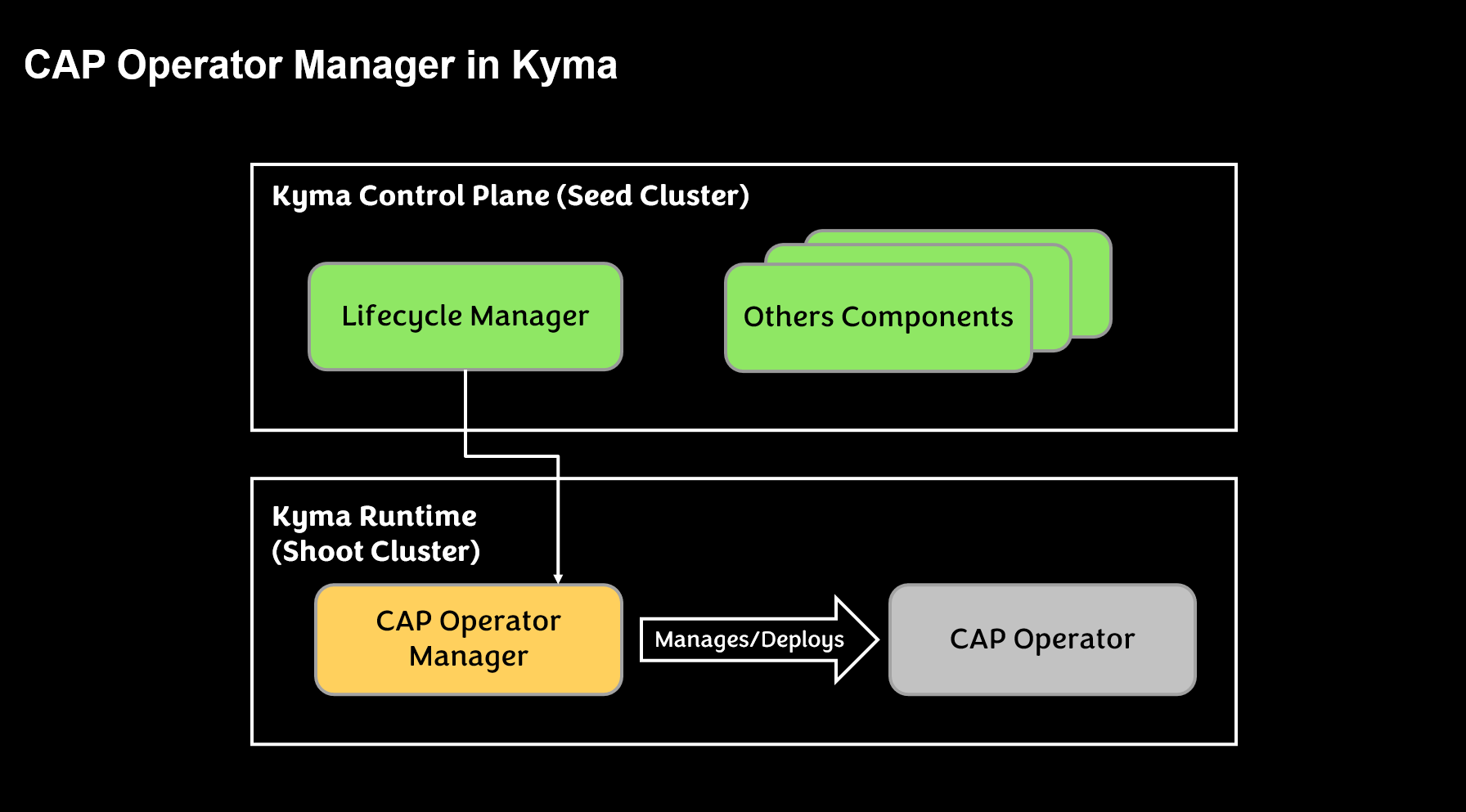
CAP Operator Manager is an operator based on Kyma lifecycle manager to install the CAP Operator. This operator uses component-operator-runtime framework to manage it’s lifecycle.
This is the multi-page printable view of this section. Click here to print.
CAP Operator Manager is an operator based on Kyma lifecycle manager to install the CAP Operator. This operator uses component-operator-runtime framework to manage it’s lifecycle.
This page provides an overview of available methods to install the CAP Operator on a Kubernetes cluster using CAP Operator Manager.
The CAP Operator is available as a Community module in Kyma clusters.
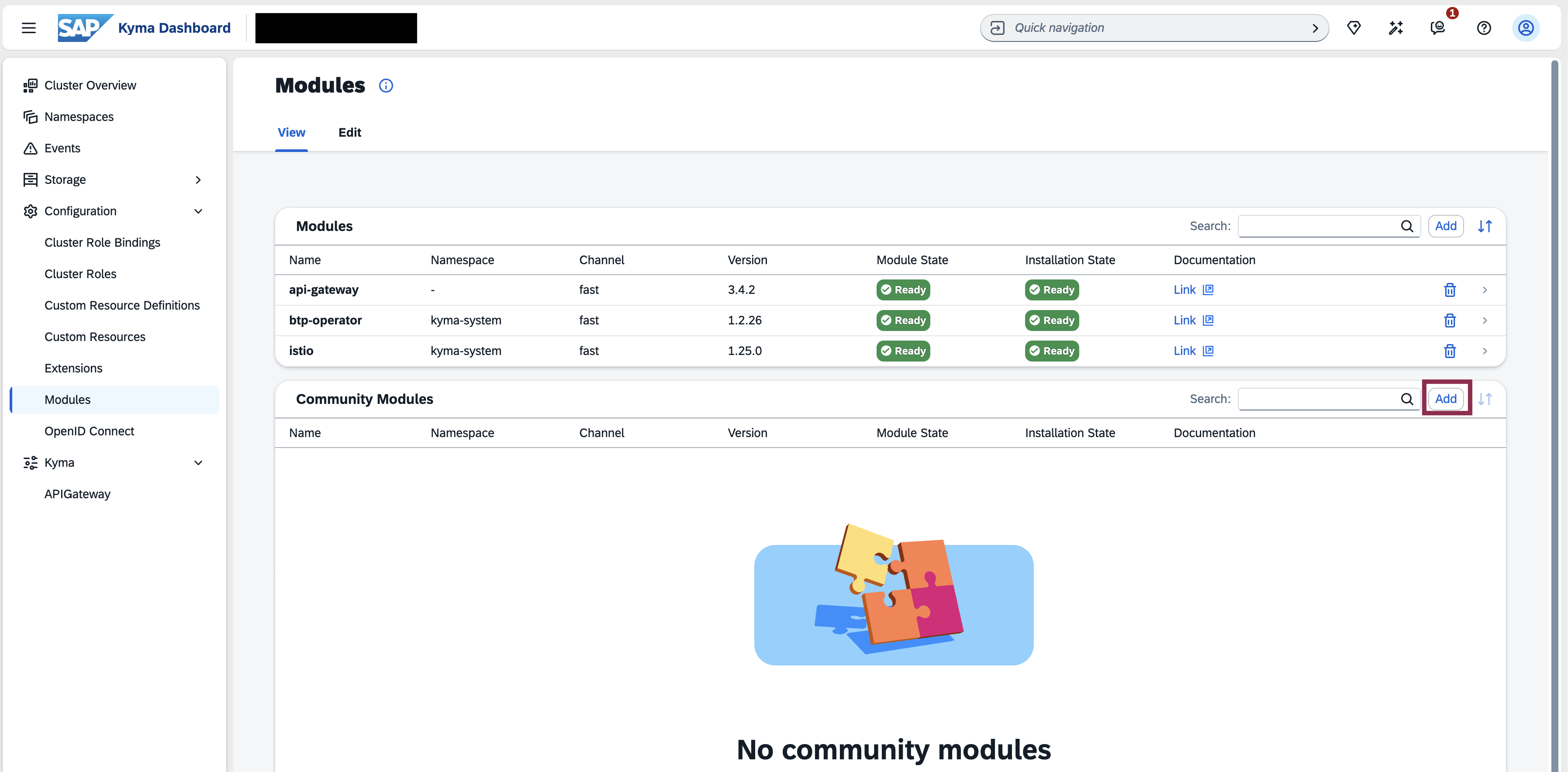
To enable the CAP Operator module in your Kyma cluster, follow these steps:
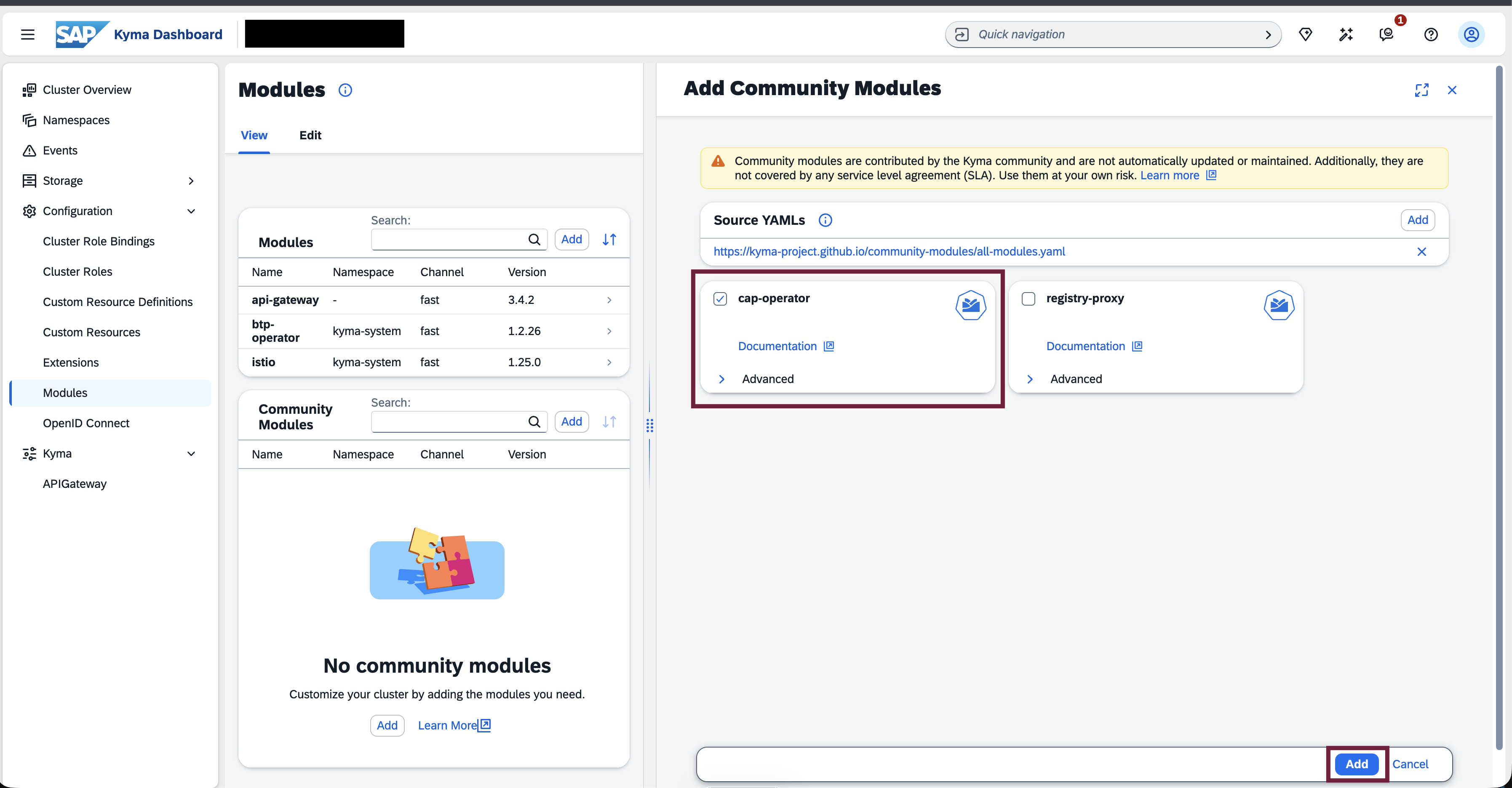
Open the Kyma Console, navigate to the Modules section, and click the Add button within Community Modules list.
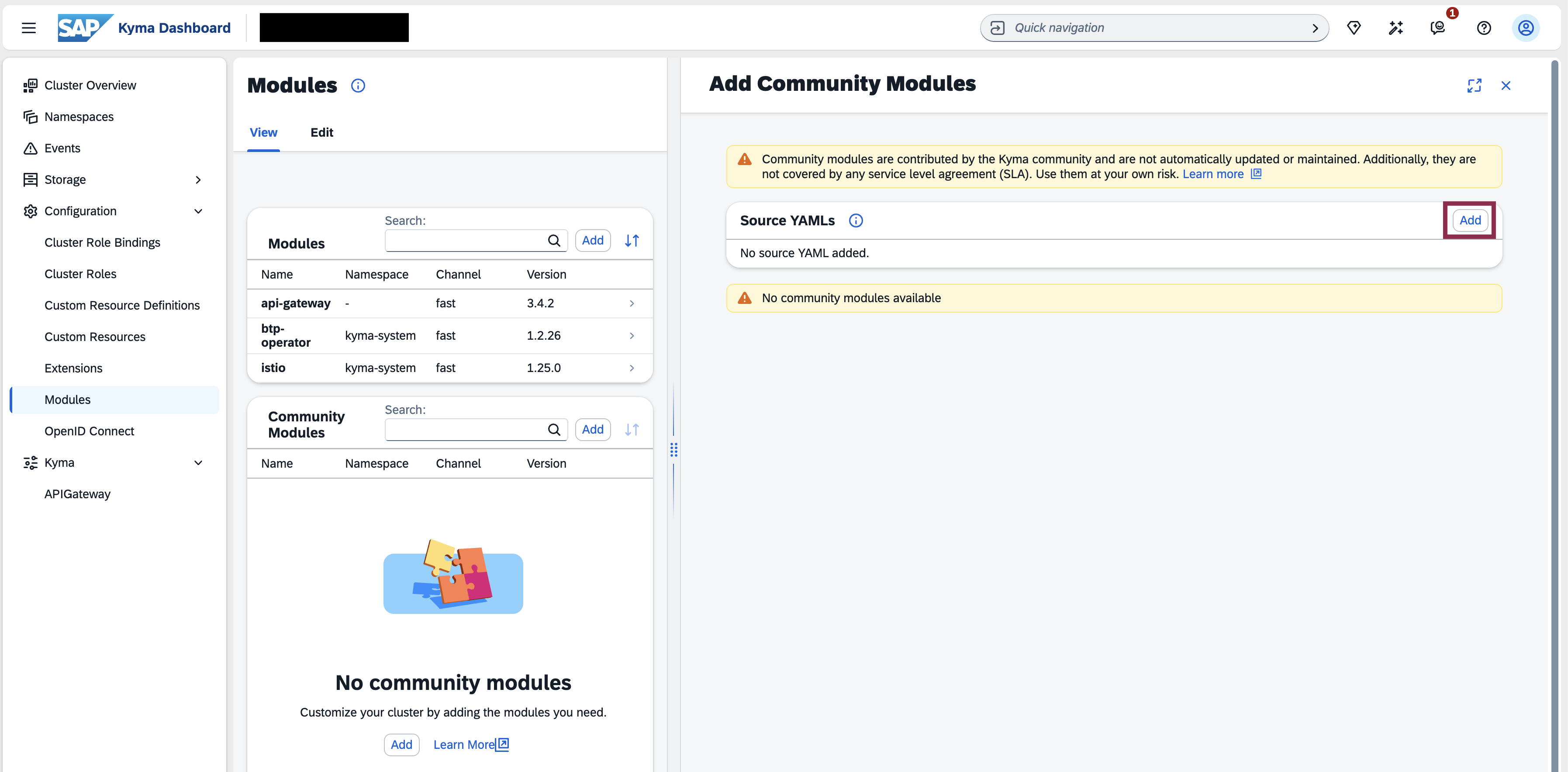
Click the Add button in the Source YAMLs section to load the list of community modules.
In the dialog that opens, you can see the list of available community modules and click the Add button.
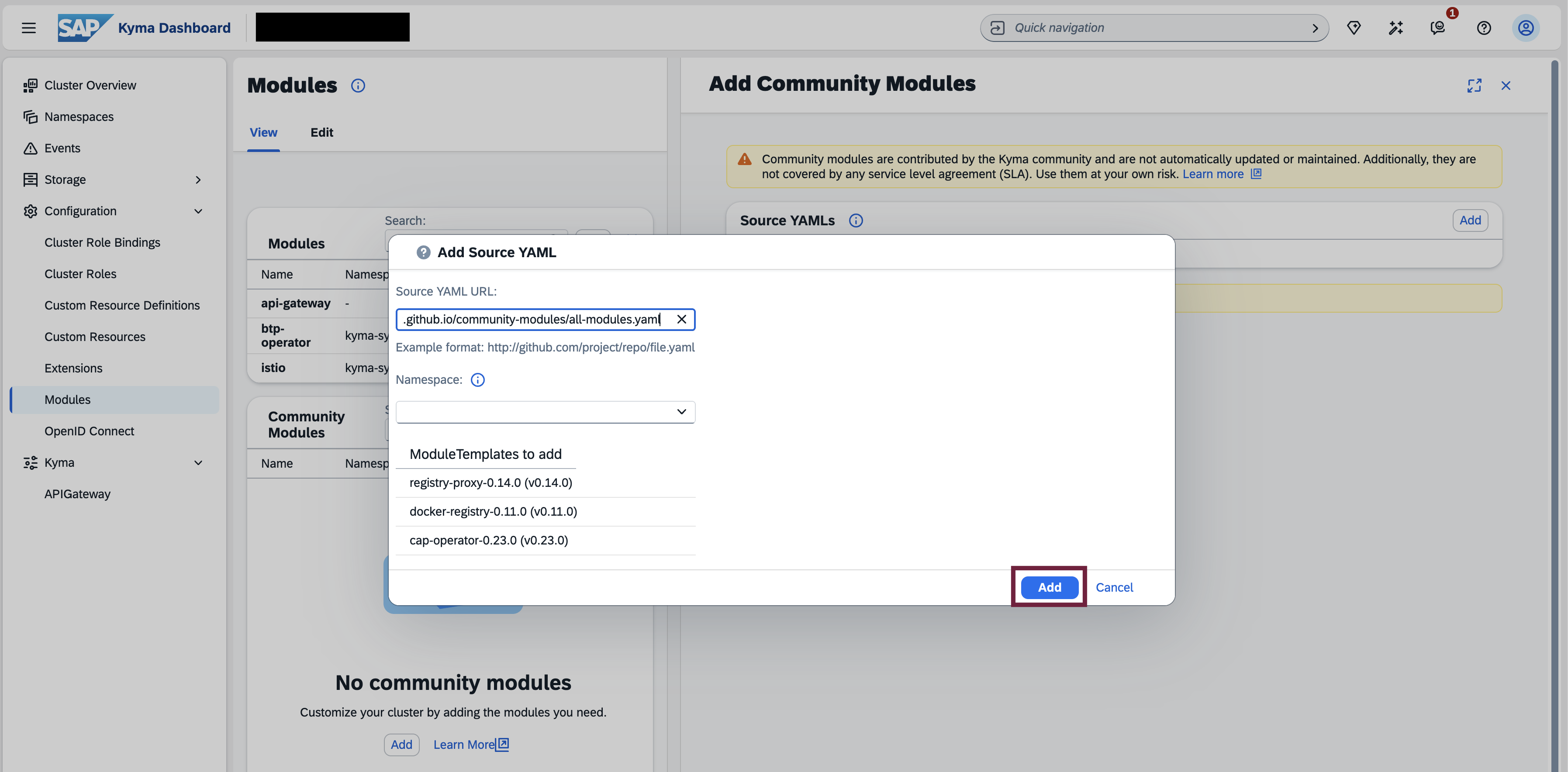
Select the CAP Operator module and click the Add button.
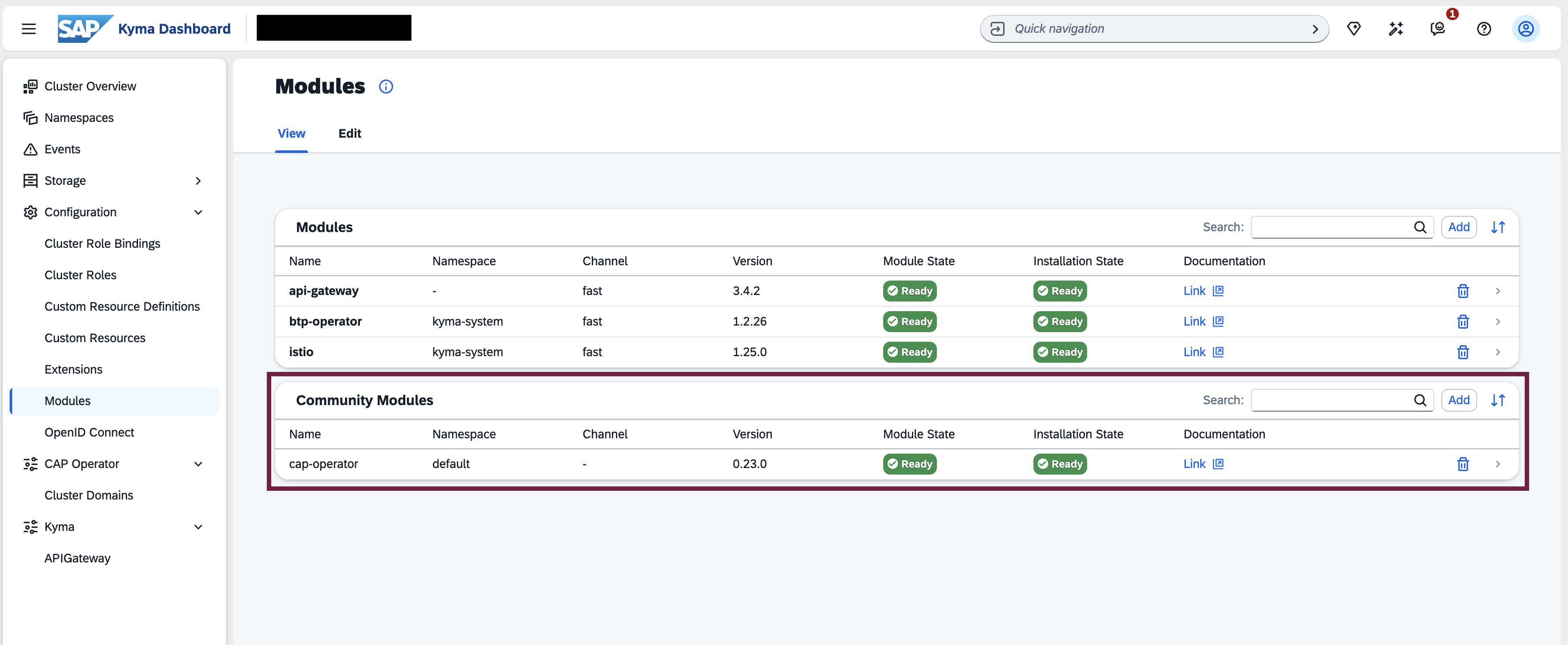
Wait for the automatic installation of the CAP Operator components into the cap-operator-system namespace to complete.
To install the latest version of CAP Operator Manager, please execute the following command:
kubectl apply -f https://github.com/SAP/cap-operator-lifecycle/releases/latest/download/manager_manifest.yaml
This would create a namespace cap-operator-system with CAP Operator Manager installed.
Once the CAP Operator Manager is running, you can install the CAP operator by executing the following command:
kubectl apply -n cap-operator-system -f https://github.com/SAP/cap-operator-lifecycle/releases/latest/download/manager_default_CR.yaml
This would work only if the ingressGatewayLabels in your clusters match the following values:
  ingressGatewayLabels:
    - name: istio
      value: ingressgateway
    - name: app
      value: istio-ingressgateway
If not, you must manually create the CAPOperator resource by applying the below yaml to the cap-operator-system namespace after filling in the ingressGatewayLabels values from your cluster.
apiVersion: operator.sme.sap.com/v1alpha1
kind: CAPOperator
metadata:
  name: cap-operator
spec:
  subscriptionServer:
    subDomain: cap-op
  ingressGatewayLabels:
    - name: <<--Label Name-->>
      value: <<--Label Value-->>
    - name: <<--Label Name-->>
      value: <<--Label Value-->>
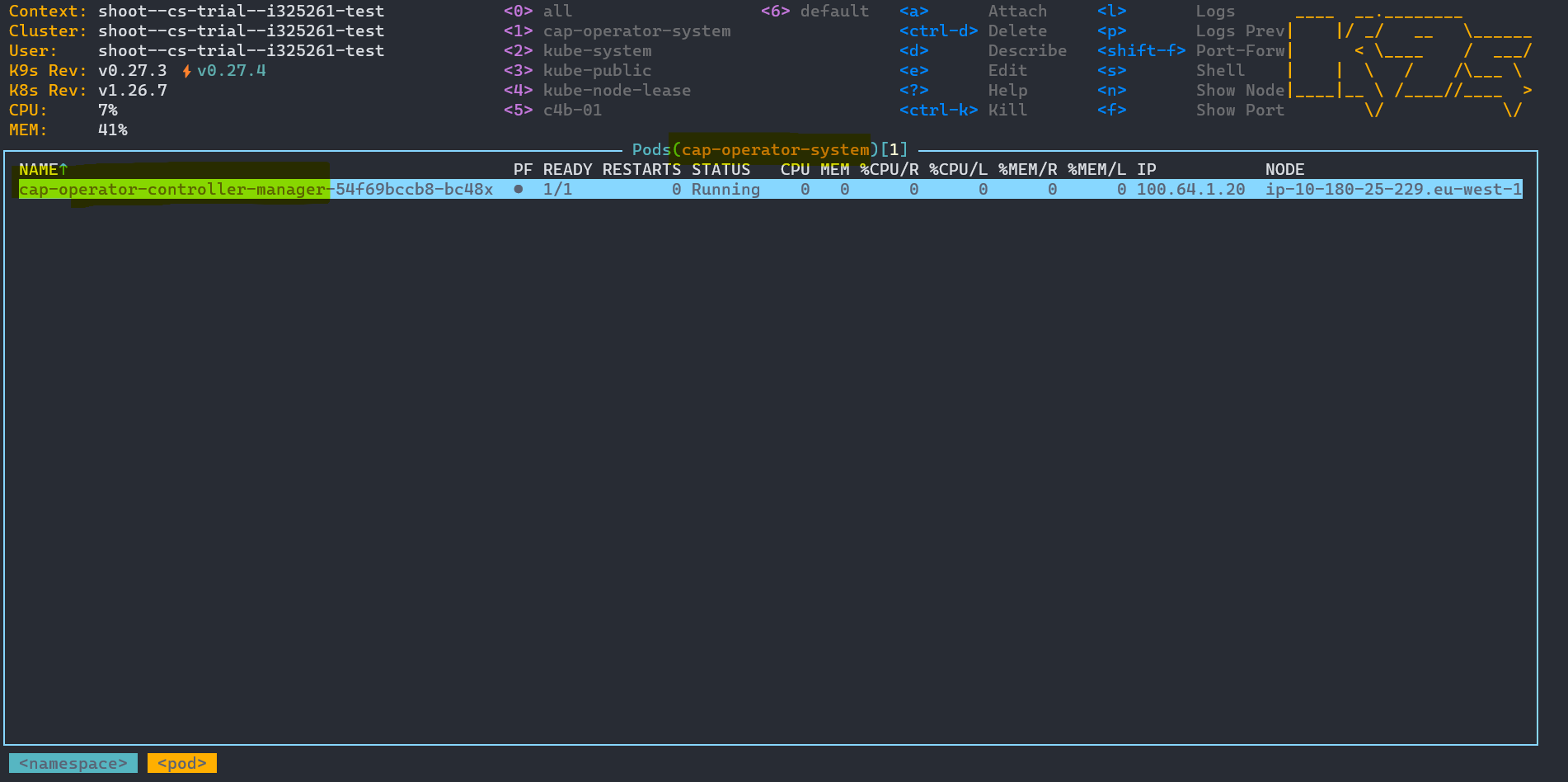
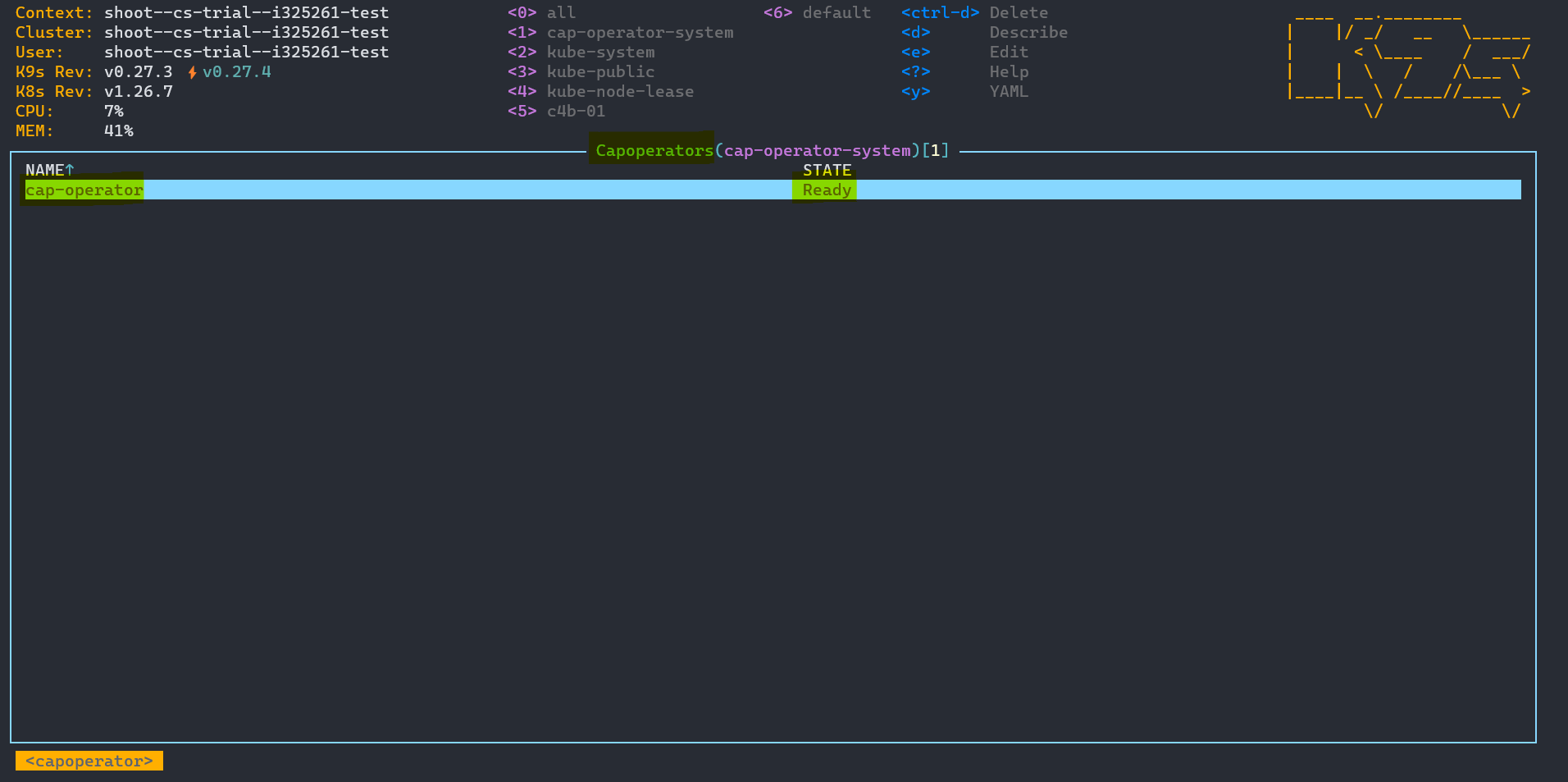
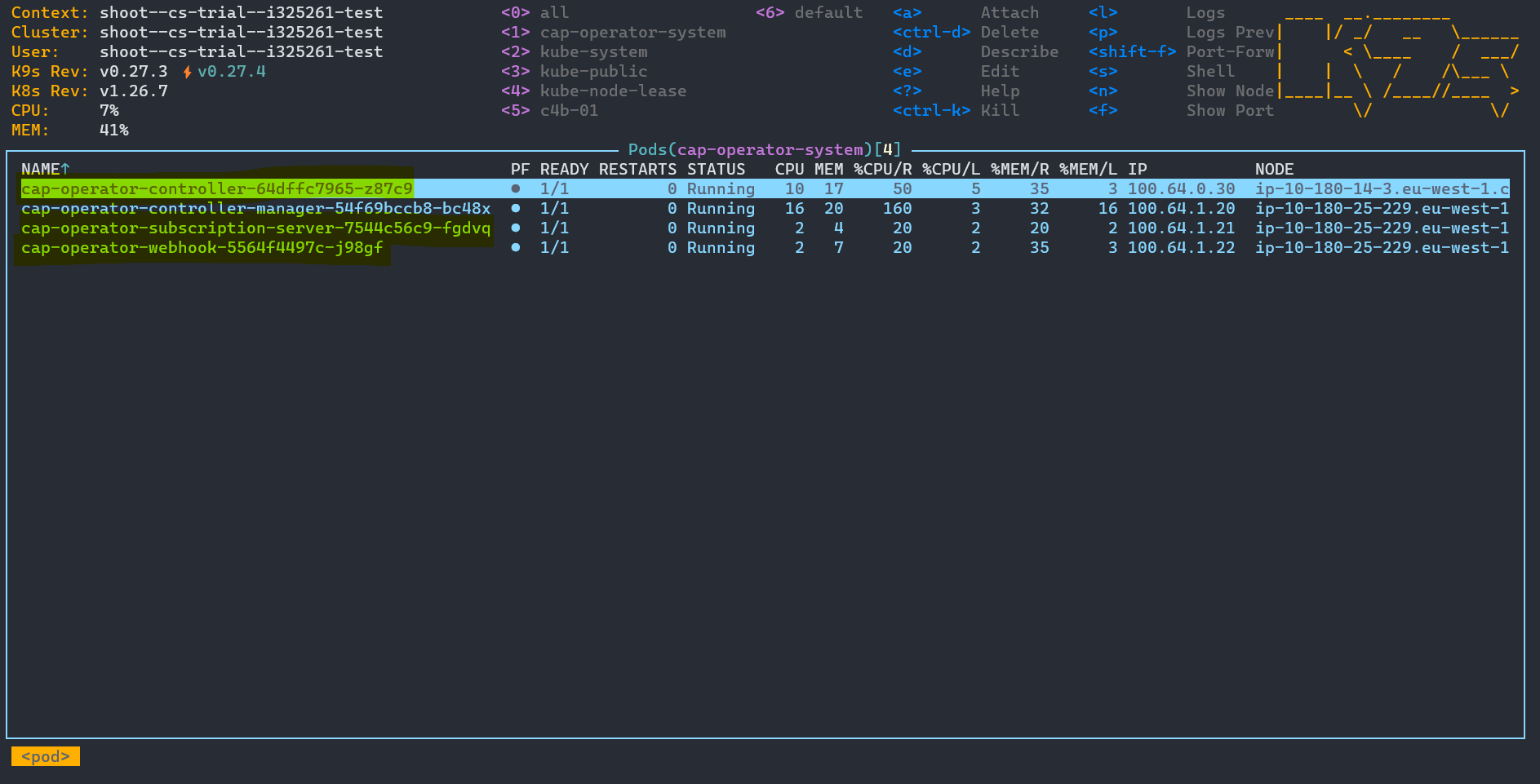
Once the CAPOperator resource is created, the CAP Operator Manager will start installing the CAP Operator in the namespace. Once the resource is ready, you can see the CAP Operator Pods running in the namespace.
CAP Operator Pods:
CAP Operator Manager uses resource CAPOperator to install the CAP Operator. The CAPOperator resource has the following attributes -
subscriptionServer.subDomain string - Subdomain of the CAP Operator subscription ServersubscriptionServer.certificateManager string - Certificate manager which can be set to either Gardener or CertManager, with the default value being GardenersubscriptionServer.certificateConfig.gardener - Configuration for Gardener certificates, applicable only if subscriptionServer.certificateManager is set to Gardener. This allows you to specify the issuerName and issuerNamespace.subscriptionServer.certificateConfig.certManager - Configuration for CertManager certificates, applicable only if subscriptionServer.certificateManager is set to CertManager. This allows you to specify the issuerGroup, issuerKind and issuerName.dnsTarget string - Public ingress URL for the cluster Load BalanceringressGatewayLabels - Labels used to identify the istio ingress-gateway component and its corresponding namespace. Usually {“app”:“istio-ingressgateway”,“istio”:“ingressgateway”}controller.detailedOperationalMetrics bool - Optionally enable detailed opertational metrics for the controller by setting this to truecontroller.versionMonitoring.prometheusAddress string - URL of the Prometheus server from which metrics related to managed application versions can be queriedcontroller.versionMonitoring.metricsEvaluationInterval - The duration (example 2h) after which versions are evaluated for deletion; based on specified workload metricscontroller.versionMonitoring.promClientAcquireRetryDelay - The duration (example 10m) to wait before retrying to acquire Prometheus client and verify connection, after a failed attemptcontroller.volumes - Optionally specify list of additional volumes for the controller pod(s)controller.volumeMounts - Optionally specify list of additional volumeMounts for the controller container(s)monitoring.enabled bool - Optionally enable Prometheus monitoring for all componentsmonitoring.serviceMonitorSelectorLabels - Optionally specify the labels that Prometheus will use to select the ServiceMonitorsmonitoring.grafana.dashboard.configMapLabels - Optionally specify the labels used to select ConfigMaps containing dashboards in Grafanawebhook.certificateManager string - Certificate manager which can be set to either Default or CertManager, with the default value being Defaultwebhook.certificateConfig.certManager - Configuration for CertManager certificates, applicable only if webhook.certificateManager is set to CertManager. This allows you to specify the issuerGroup, issuerKind and issuerName.The below example shows a fully configured CAPOperator resource:
apiVersion: operator.sme.sap.com/v1alpha1
kind: CAPOperator
metadata:
  name: cap-operator
spec:
  subscriptionServer:
    subDomain: cap-op
    certificateManager: Gardener
    certificateConfig:
      gardener:
        issuerName: "gardener-issuer-name"
        issuerNamespace: "gardener-issuer-namespace"
  ingressGatewayLabels:
    - name: istio
      value: ingressgateway
    - name: app
      value: istio-ingressgateway
  monitoring:
    enabled: true
    serviceMonitorSelectorLabels:
      release: "prometheus-operator"
    grafana:
      dashboard:
        configMapLabels:
          grafana_dashboard: "1"
  controller:
    detailedOperationalMetrics: true
    versionMonitoring:
      prometheusAddress: "http://prometheus-operated.monitoring.svc.cluster.local:9090" # <-- example of a Prometheus server running inside the same cluster
      promClientAcquireRetryDelay: "2h"
      metricsEvaluationInterval: "30m"
  webhook:
    certificateManager: CertManager
    certificateConfig:
      certManager:
        issuerGroup: "certManager-issuer-group"
        issuerKind: "certManager-issuer-kind"
        issuerName: "certManager-issuer-name"
Here, we will automatically determine the cluster shoot domain and install the CAP Operator by setting the subscription server domain and the DNS Target. The DNS target is derived using the ingressGatewayLabels. For the above example, if the determined the cluster shoot domain is test.stage.kyma.ondemand.com, then the domain will be set as cap-op.test.stage.kyma.ondemand.com by default.
Note: The length of the domain should be less than 64 characters. Depending up on your cluster shoot domain, please choose a length appropriate subdomain.
The user can also maintain the DNS Target manually. In such cases, we will take over the value as it is. The user can maintain the DNS Target as shown below:
apiVersion: operator.sme.sap.com/v1alpha1
kind: CAPOperator
metadata:
  name: cap-operator
spec:
  subscriptionServer:
    subDomain: cap-op
  dnsTarget: public-ingress-custom.test.stage.kyma.ondemand.com
This page provides an overview of the steps required to migrate the CAP Operator installed via Helm or Manifest to the Kyma Community Module without deleting your deployed applications.
If you have installed the CAP Operator using Helm, please follow the steps below to migrate to the Kyma Community Module:
helm uninstall cap-operator -n cap-operator-system
Note: The release name and namespace may vary based on your installation. Please ensure to use the correct release name and namespace in the command.
If you have installed the CAP Operator using a manifest, please follow the steps below to migrate to the Kyma Community Module:
operator.sme.sap.com/retain-resources="true" to the CAPOperator resource to ensure that your deployed applications are not deleted during the migration process. You can do this by running the following command:kubectl annotate capoperator cap-operator operator.sme.sap.com/retain-resources="true"
Wait till the annotation is applied and the CAPOperator resource is ready.
Delete the CAPOperator resource using the following command:
kubectl delete -f https://github.com/SAP/cap-operator-lifecycle/releases/latest/download/manager_default_CR.yaml
kubectl delete -f https://github.com/SAP/cap-operator-lifecycle/releases/latest/download/manager_manifest.yaml
To report a bug, please create an issue.
See anything missing? Please let us know or raise a PR.
Reach out to the project team and the project community via the following communication channels:
Packages:
Package v1alpha1 contains API Schema definitions for the operator v1alpha1 API group
CAPOperator is the Schema for the CAPOperators API
| Field | Description | ||||||||||||
|---|---|---|---|---|---|---|---|---|---|---|---|---|---|
metadataKubernetes meta/v1.ObjectMeta | Refer to the Kubernetes API documentation for the fields of the
metadata field. | ||||||||||||
specCAPOperatorSpec |
| ||||||||||||
statusCAPOperatorStatus |
(Appears on: CAPOperator)
CAPOperatorSpec defines the desired state of CAPOperator
| Field | Description |
|---|---|
subscriptionServerSubscriptionServer | SubscriptionServer specification |
dnsTargetstring | Public ingress URL for the cluster Load Balancer |
ingressGatewayLabels[]NameValue | Labels used to identify the istio ingress-gateway component and its corresponding namespace. Usually {“app”:“istio-ingressgateway”,“istio”:“ingressgateway”} |
controllerController | Controller specification |
monitoringMonitoring | Monitoring specification |
webhookWebhook | Webhook specification |
(Appears on: CAPOperator)
| Field | Description |
|---|---|
Statusgithub.com/sap/component-operator-runtime/pkg/component.Status | (Members of add other fields to status subresource here |
(Appears on: CertificateConfig)
| Field | Description |
|---|---|
issuerNamestring | Issuer name |
issuerKindstring | Issuer kind |
issuerGroupstring | Issuer group |
(Appears on: SubscriptionServer, Webhook)
| Field | Description |
|---|---|
gardenerGardener | Gardener configuration |
certManagerCertManager | CertManager configuration |
string alias)(Appears on: SubscriptionServer, Webhook)
Supported values are Gardener, CertManager, or Default For the subscription server, it can be either Gardener or CertManager, while for the webhook, it can be either Default or CertManager
(Appears on: Controller)
| Field | Description |
|---|---|
qpsstring | Maximum queries per second from the controller client to the kubernetes API server (e.g. “20”) |
burststring | Maximum burst for throttle (e.g. “30”) |
(Appears on: Controller, SubscriptionServer, Webhook)
Common aspects for Controller, SubscriptionServer and Webhook
| Field | Description |
|---|---|
replicasint32 | Number of replicas |
resourcesKubernetes core/v1.ResourceRequirements | Resource Requirements configuration |
nodeSelectormap[string]string | Node selector |
affinityKubernetes core/v1.Affinity | Affinity settings |
tolerations[]Kubernetes core/v1.Toleration | Tolerations |
priorityClassNamestring | Priority class name |
topologySpreadConstraints[]Kubernetes core/v1.TopologySpreadConstraint | Topology spread constraints |
podSecurityContextKubernetes core/v1.PodSecurityContext | Pod Security context |
securityContextKubernetes core/v1.SecurityContext | Security context |
volumes[]Kubernetes core/v1.Volume | Optionally specify list of additional volumes for the controller pod(s) |
volumeMounts[]Kubernetes core/v1.VolumeMount | Optionally specify list of additional volumeMounts for the controller container(s) |
(Appears on: CAPOperatorSpec)
| Field | Description |
|---|---|
CommonConfigCommonConfig | (Members of |
detailedOperationalMetricsbool | Optionally enable detailed opertational metrics for the controller by setting this to true |
maxConcurrentReconcilesMaxConcurrentReconciles | Configuration of maximum number of concurrent reconciles for the resources managed by the controller |
versionMonitoringVersionMonitoring | Version monitoring configuration |
clientRateLimitingClientRateLimiting | Client rate limiting configuration for the controller client to the kubernetes API server |
rolloutDelayKubernetes meta/v1.Duration | The delay (example 1h) to wait before rolling out version workloads on credential update |
string alias)(Appears on: VersionMonitoring)
Duration is a valid time duration that can be parsed by Prometheus
Supported units: y, w, d, h, m, s, ms
Examples: 30s, 1m, 1h20m15s, 15d
(Appears on: CertificateConfig)
| Field | Description |
|---|---|
issuerNamestring | Issuer name |
issuerNamespacestring | Issuer namespace |
(Appears on: Monitoring)
| Field | Description |
|---|---|
dashboardGrafanaDashboard | Dashboard configuration |
(Appears on: Grafana)
| Field | Description |
|---|---|
configMapLabelsmap[string]string | Labels for selecting ConfigMaps with dashboards in Grafana |
(Appears on: Controller)
| Field | Description |
|---|---|
capApplicationstring | Maximum number of concurrent reconciles for the cap application |
capApplicationVersionstring | Maximum number of concurrent reconciles for the cap application version |
capTenantstring | Maximum number of concurrent reconciles for the cap tenant |
capTenantOperationstring | Maximum number of concurrent reconciles for the cap tenant operation |
domainstring | Maximum number of concurrent reconciles for the domain |
clusterDomainstring | Maximum number of concurrent reconciles for the cluster domain |
(Appears on: CAPOperatorSpec)
| Field | Description |
|---|---|
enabledbool | Optionally enable Prometheus monitoring for all components |
serviceMonitorSelectorLabelsmap[string]string | Prometheus service monitor selector labels |
grafanaGrafana | Grafana configuration |
(Appears on: CAPOperatorSpec)
Generic Name/Value configuration
| Field | Description |
|---|---|
namestring | |
valuestring |
(Appears on: CAPOperatorSpec)
| Field | Description |
|---|---|
CommonConfigCommonConfig | (Members of |
subDomainstring | |
certificateManagerCertificateManager | Certificate manager which can be either |
certificateConfigCertificateConfig | Certificate configuration |
(Appears on: Controller)
| Field | Description |
|---|---|
prometheusAddressstring | URL of the Prometheus server from which metrics related to managed application versions can be queried |
metricsEvaluationIntervalDuration | The duration (example 2h) after which versions are evaluated for deletion; based on specified workload metrics |
promClientAcquireRetryDelayDuration | The duration (example 10m) to wait before retrying to acquire Prometheus client and verify connection, after a failed attempt |
(Appears on: CAPOperatorSpec)
| Field | Description |
|---|---|
CommonConfigCommonConfig | (Members of |
certificateManagerCertificateManager | Certificate manager which can be either |
certificateConfigCertificateConfig | Certificate configuration |
Generated with gen-crd-api-reference-docs
.